Sunday, January 12, 2014

Versions and Service Packs of SQL Server (2012, 2008 R2, 2008, 2005)

Have you installed all service packs and necessary patches for all your SQL Server instances? Check the version with this table, if not, get them downloaded and installed.

SQL Server Code Name Initial Version Service Packs
2014

Hekaton

12.00.2000.8

CU1: 12.0.2342.0
CU3: 12.0.2402
2012

Denali

11.00.2100

SP1: 11.00.3000
SP1: CU#7: 11.0.3393
SP1: CU#8: 11.0.3401
SP1: CU#9: 11.0.3412
SP2: 11.0.5058
SP2: HotFix – 11.0.5522
SP2: CU#1: 11.0.5532

2008 R2

Kilimanjaro

10.50.1600.1

SP1: 10.50.2500
SP2: 10.50.4000
SP2: CU#11: 10.50.4302
SP2: CU#12: 10.50.4305
2008

Katmai

10.00.1600.22

SP1: 10.00.2531
SP2: 10.00.4000
SP3: 10.00.5500
SP3: CU#14: 10.00.5848
2005

Yukon

9.00.1399.06

SP1: 9.00.2047
SP2: 9.00.3042
SP3: 9.00.4035
SP4: 9.00.5000
SP4: CU#3: 9.00.5266

Here are couple of ways of determining the version of your SQL Server instance;

1. SQL Server Management Studio: Object Explorer

image

2. @@VERSION global variable

image

3. SERVERPROPERTY function

image

Friday, January 3, 2014

Demo links for SS SLUG Dec 2013 - Brain Bashers

Demo 1: Filtering DateTime values – SS SLUG Dec 2013 – SQL Brain Bashers - Demo I

Demo 2: How SQL Server interprets two-digit years as four-digit years – SS SLUG Dec 2013 – Brain Bashers - Demo II

Demo 3: Best way to pass datetime values to SQL Server – SS SLUG Dec 2013 – Brain Bashers - Demo III

Demo 4: Can we commit inner (or nested) transactions?– SS SLUG Dec 2013 – Brain Bashers - Demo IV

Demo 5: http://dinesql.blogspot.com/2010/02/understanding-grouping-sets.html

Demo 6: Are you calculating Average correctly?

Demo 7: DBCC CHECKIDENT does not reset identity value as you need?

Demo 8: Ordering the result of Views – SS SLUG Dec 2013 – Brain Bashers - Demo VIII

Link for the presentation: {Pending}

Why SQL Server splits the page? I am changing an integer value.

If someone asks “Why SQL Server splits pages”, I know that all of you say “If an insert or update requires more space, SQL Server splits the page and moves half of the records to the new page”. It is true. This makes the table externally fragmented too. However, can there be a scenario which an change of integer value splits the page? There can be, and here it is.

Before that, if you need to understand page-split and fragmentation, read this: http://dinesql.blogspot.com/2013/08/understanding-index-fragmentation-ss.html.

We will start with a simple code. Have a look on below code;

USE tempdb
GO
 
-- creating test table
CREATE TABLE dbo.TestTable
(
    Id int PRIMARY KEY
    , Value char(4000) NOT NULL
)
GO
 
-- inserting 2 records
INSERT INTO dbo.TestTable
    VALUES 
    (2, replicate('a', 4000)), (5, replicate('b', 4000))
 
-- check records with page numbers
SELECT Id, Value, ph.*
FROM dbo.TestTable
CROSS APPLY fn_PhysLocCracker(%%PHYSLOC%%) ph

I have used two functions for getting page numbers related to inserted records. For more info on these two functions, read this: http://dinesql.blogspot.com/2013/12/finding-pages-or-physical-location-of.html

Here is the result of the SELECT;

image

As you with the result, both records are in same page, and becuase of the size of records, page is almost full. Let’s do a modification to Value column first and see whether it causes a page split.

UPDATE dbo.TestTable
    SET Value = replicate('e', 4000)
WHERE id = 2
 
SELECT Id, Value, ph.*
FROM dbo.TestTable
CROSS APPLY fn_PhysLocCracker(%%PHYSLOC%%) ph

image

Result is same. Getting 4000 bytes as a changed value has not required additional space and page split has not occurred. Now let’s make a change on Id column.

UPDATE dbo.TestTable
    SET Id = 3
WHERE id = 2
 
SELECT Id, Value, ph.*
FROM dbo.TestTable
CROSS APPLY fn_PhysLocCracker(%%PHYSLOC%%) ph

image

Page split has occurred. Why SQL Server needs space and splits the page ONLY IF IT IS AN INTEGER COLUMN? This is what you have understand. Note that this is not just an integer column. It is the PRIMARY KEY; The clustered key. What happened was, SQL Server updated the Value column as an in-place update. It does not require additional space. However SQL Server does not perform in-place update for key columns. It performs delete-plus-insert operation for key column updates. It requires space for the INSERT. That is the reason for the page split. Understand that this behavior is not only for integer, it is for all key columns.

I will make another post on in-place update and delete-plus-insert operation.

Wednesday, January 1, 2014

Ordering the result of Views – SS SLUG Dec 2013 – Brain Bashers - Demo VIII

First of all, Happy New Year 2014! May your all dreams come true in 2014!

This post is related to the presentation “SQL Brain Bashers” I did at SQL Sever Sri Lanka User Group Meeting. This topic is very old but still it needs to be discussed for beginners; it is all about having ORDER BY with VIEWs.

Here is the question related to this demo;

Does SQL Server sort the resultset returning from a view based on ORDER BY clause added?

Answer is “NO”. Have a look on below code and then see the explanation.

USE AdventureWorks2012
GO
 
-- this throws an error
-- read the error properly
CREATE VIEW v_SalesOrdersDetails
AS
SELECT SalesOrderID, SalesOrderDetailID
    , CarrierTrackingNumber, OrderQty
    , ProductID, LineTotal
FROM Sales.SalesOrderDetail
ORDER BY ProductID DESC
GO
 
-- this creates the view
CREATE VIEW v_SalesOrdersDetails
AS
SELECT TOP 100 PERCENT 
    SalesOrderID, SalesOrderDetailID
    , CarrierTrackingNumber, OrderQty
    , ProductID, LineTotal
FROM Sales.SalesOrderDetail
ORDER BY ProductID DESC
GO
 
-- this query does not sort the
-- result by product id
SELECT * FROM v_SalesOrdersDetails 
 
-- this sorts as we have added
-- to the query
SELECT * FROM v_SalesOrdersDetails 
ORDER BY ProductID DESC 

Here is the result;

View

As you see, the ORDER BY clause we have added to the view has no effects.

Let’s try to understand this behavior. Remember the error thrown from first try. It clearly says that ORDER BY cannot be used with VIEWs. Looks weird :)? There is nothing wrong with it. View is supposed to represent a table. A table is a logical entity that does not hold ordered rows, hence view cannot hold ordered rows too. However SQL Server allows to use ORDER BY clause with views when TOP or FOR XML is used. Again, remember, though you have used ORDER BY with TOP, it does not sort the result, it uses ORDER BY for completing TOP operation only (Note: Generally it uses ORDER BY for two purposes; Which rows to be picked for the TOP, and order the result).

There is a misconception that adding TOP 99.99 PERCENT sorts the result set based on ORDER BY added. The fact is, it is wrong too, SQL Server does not guarantee a sorted resultset. Not only that, the result set might not contain all records returned.

Monday, December 30, 2013

Can we commit inner (or nested) transactions?– SS SLUG Dec 2013 – Brain Bashers - Demo IV

This post is related to the presentation “SQL Brain Bashers” I did at SQL Sever Sri Lanka User Group Meeting. This speaks about committing nested transactions.

Here is the question related to this demo;

Can we commit the inner transaction (or nested transaction) without committing the most outer transaction?

Answer is simple. The concept of nested transaction does not exist with Microsoft SQL Server though we can have multiple BEGIN TRAN and COMMIT TRAN statements respectively.

What exactly happen with inner BEGIN TRAN and inner COMMIT TRAN?
They do nothing but increases and decreases @@TRANCOUNT. Note that @@TRANCOUNT giving a value greater than one does not mean that there are more than one transactions. It means there are more than one BEGIN TRAN statements. Committing all statements is actually done by most outer COMMIT TRAN statement.

Then what is the purpose of nested transaction in SQL Server?
It is meaningless to have multiple BEGIN TRAN statements in a same scope (example, in one stored procedure). However this allows to track the count of BEGIN TRAN in nested operations; Stored procedure executes BEGIN TRAN and then calls another stored procedure that has BEGIN TRAN. The count helps SQL Server to determine at which COMMIT TRAN actions should be committed.

Are you sure?
You may ask that question. Let’s test this and see.

Let’s execute the following code. It creates a database and a table, then inserts two records after starting a transaction with BEGIN TRAN.

CREATE DATABASE TestDB
GO
 
USE TestDB
GO
 
-- create a table 
CREATE TABLE dbo.TestTable
(
    Id int PRIMARY KEY
    , Value char(500) NOT NULL
)
GO
 
-- start a transaction
BEGIN TRAN
 
-- do some actions
INSERT INTO dbo.TestTable
    (Id, Value)
VALUES
    (1, 'Test Value 1')
INSERT INTO dbo.TestTable
    (Id, Value)
VALUES
    (2, 'Test Value 2')

Let’s check the @@TRANCOUNT and bytes used for this transaction.

SELECT @@TRANCOUNT AS TransactionCount
 
SELECT database_transaction_log_bytes_used
FROM sys.dm_tran_database_transactions
WHERE database_id = DB_ID('TestDB')

Transaction1 

As you see, the count is 1 and 1408 bytes used for the transaction. Let’s have another BEGIN TRAN and some INSERTs, and check the same.

-- add another BEGIN TRAN
BEGIN TRAN

-- do some actions
INSERT INTO dbo.TestTable
    (Id, Value)
VALUES
    (3, 'Test Value 3')
INSERT INTO dbo.TestTable
    (Id, Value)
VALUES
    (4, 'Test Value 4')


SELECT @@TRANCOUNT AS TransactionCount

SELECT database_transaction_log_bytes_used
FROM sys.dm_tran_database_transactions
WHERE database_id = DB_ID('TestDB')

Transaction2

It increases the count and bytes used. Now, let’s have one COMMIT TRAN statement and check again.

COMMIT TRAN
 
SELECT @@TRANCOUNT AS TransactionCount
 
SELECT database_transaction_log_bytes_used
FROM sys.dm_tran_database_transactions
WHERE database_id = DB_ID('TestDB')

Transaction3

Now @@TRANCOUNT is again 1 but number of bytes used is same. This clearly shows that inner COMMIT TRAN statements do not do anything other than decreasing @@TRANCOUNT. Let’s execute the COMMIT TRAN again and see.

COMMIT TRAN
 
SELECT @@TRANCOUNT AS TransactionCount
 
SELECT database_transaction_log_bytes_used
FROM sys.dm_tran_database_transactions
WHERE database_id = DB_ID('TestDB')

Transaction4

Everything is clear now. This proves that inner BEGIN TRAN and COMMIT TRAN do not do anything other than changing the @@TRANCOUNT.

Can I rollback part of the actions performed in my transaction?
Yes, it is possible with SAVE TRAN statement. It allows to set savepoints in the transaction and rollback the transaction to the savepoint.

Sunday, December 29, 2013

Best way to pass datetime values to SQL Server – SS SLUG Dec 2013 – Brain Bashers - Demo III

This post is related to the presentation “SQL Brain Bashers” I did at SQL Sever Sri Lanka User Group Meeting. This speaks about different ways of passing datetime values to SQL Server databases.

Here is the question related to this demo;

There are many ways to pass datetime values to SQL Server. Some of ways are;

  1. Value formatted as a string value
  2. Value formatted as a datetime value
  3. Value formatted as a datetime value and accepted via DATEFORMAT option
  4. Value formatted as a ISO 8601 datetime value

What is the best way?

Majority uses the second option. It works fine as long as all applications are using correct datetime formats and all are in same country. However there could be misinterpretation if one of the application uses a different convention. Have a look on below C#.NET code (Note that the code written to show the demo only, it may not be the correct way to be written).

USE tempdb
GO
CREATE PROCEDURE dbo.ShowMonth @DateTimeValue datetime
    , @Month varchar(10) OUTPUT
AS
BEGIN
 
    SET @Month = DATENAME(m, @DateTimeValue)
END
GO


string year, month, date, datetime;
            
// making the datetime value from different string values
year = "2013";
month = "05";
date = "01";
datetime = month + "/" + date + "/" + year + " 00:00:00";
DateTime convertedDate = Convert.ToDateTime(datetime);
 
// set connection and command
SqlConnection connection = new SqlConnection(@"Server=SL-DEV001\SQL2012;Database=tempdb;uid=Dinesh;pwd=Dinesh");
SqlCommand command = new SqlCommand("dbo.ShowMonth", connection);
command.CommandType = CommandType.StoredProcedure;
 
SqlParameter parameterDateTime = new SqlParameter("DateTimeValue", SqlDbType.DateTime);
parameterDateTime.Value = convertedDate;
parameterDateTime.Direction = ParameterDirection.Input;
command.Parameters.Add(parameterDateTime);
 
SqlParameter parameterMonth = new SqlParameter("Month", SqlDbType.VarChar, 10);
parameterMonth.Direction = ParameterDirection.Output;
command.Parameters.Add(parameterMonth);
 
connection.Open();
command.ExecuteNonQuery();
connection.Close();
 
Console.WriteLine(parameterMonth.Value.ToString());

When you execute the code, it returns the “month” as follows;

Output1

Now let’s change the “Culture” of the current thread. Add the below code as the first statement of C#.NET code.

Thread.CurrentThread.CurrentCulture = new CultureInfo("fr-FR");

And when the code is run, result is;

Output2

As you see, “month” returns from the stored procedure is now wrong. It means, Date has been misinterpreted by either application or SQL Server.

Now let’s change the way we pass the date and time as per ISO 8601;

//datetime = month + "/" + date + "/" + year + " 00:00:00";
datetime = year + "-" + month + "-" + date +  "T00:00:00";

If you execute the code now, SQL Server identifies the elements of passed value properly regardless of Culture setting and returns the value correctly. Therefore 4th option is the best way to pass datetime values to SQL Server.

ISO 8601
This is an international standard for exchanging dates and times. This standard provides an unambiguous and well-defined method of representing dates and times and avoids misinterpretation of dates and times.

Format of this standard separates date and time using “T” (uppercase). Year needs to be set with 4 digits, month needs to be set with 2 digits and, day needs to be set with 2 digits. Time sets in 24 hours format. Hour, minute and second are separated using “:” and fraction of second is separated using “.”.

For an example, “8-Jan-2013 2:45:44” as per ISO 8601 is “2013-01-08T14:45:44.000”.

When this is used with SQL Server, setting related to SET DATEFORMAT and SET LANGUAGE is ignored.

If you need to convert stored datetime values to ISO 8601 for exchanging them with another party, here is the way;

SELECT CONVERT(char(23), DateValue, 126)

You can use 127 instead of 126 if time zone information is required.

Read more on ISO 8601: http://en.wikipedia.org/wiki/ISO_8601#Dates

Wednesday, December 25, 2013

How SQL Server interprets two-digit years as four-digit years – SS SLUG Dec 2013 – Brain Bashers - Demo II

This is based on the presentation titled “SQL Brain Bashers” I did at SQL Sever Sri Lanka User Group Meeting. This discusses the way SQL Server interprets two-digit years to four-digit years.

Here is the question related to this demo;

You execute the following query. Note that the “years” of input values are sent as two-digit years.

DECLARE @datetime datetime
SET @datetime = '01/01/00'
SELECT YEAR (@datetime)
 
SET @datetime = '01/01/30'
SELECT YEAR (@datetime)
 
SET @datetime = '01/01/40'
SELECT YEAR (@datetime)
 
SET @datetime = '01/01/50'
SELECT YEAR (@datetime)

How SQL Server interprets each year to four-digit years?

In order to answer this question, you need to know the two digit year cutoff which SQL Server uses for determining the year. The default value of two digit year cutoff is 2049. If you pass a two-digit year that is less than or equal to last two digits of cutoff year (2049), SQL Server uses the same century as the cutoff year. Here is the result of above query;

Datetime2

Since the 50 is above cutoff year, it has been interpreted as 1950. All other two-digit years are set with century of the cutoff year.

You can change the cutoff year if required. This option appears only if “show advanced options” is enabled via sp_configure. If “show advanced options” is not enabled, enable it. Then, set the value you need for “two digit year cutoff”. The below code sets it as 2060.

-- enable advanced options
sp_configure 'show advanced options', 1
GO
reconfigure
 
-- set two digit year cutoff as 2060
sp_configure 'two digit year cutoff', 2060
GO
reconfigure

Let’s run the query again and see;

Datetime3

As you see, 50 is less than current cutoff year. Therefore even last value is taken as 2050. Change it back to 2049 to maintain the backward compatibility.

You need to know one more thing on this setting. If you are accepting year values via an OLE Automation object, you need to be aware that its cutoff year is 2030, not 2040. For an example, if a .NET application is used for sending values for a stored procedure and values are set as two-digit years, you may notice unacceptable years. Look at below code and see. If two-digit values are less than last two digit of cutoff year, it uses century of cutoff year.

DateTime dt;
dt = Convert.ToDateTime("01-01-00");
Console.WriteLine(dt.ToString());
dt = Convert.ToDateTime("01-01-30");
Console.WriteLine(dt.ToString());
dt = Convert.ToDateTime("01-01-40");
Console.WriteLine(dt.ToString());
dt = Convert.ToDateTime("01-01-50");
Console.WriteLine(dt.ToString());

Datetime4

Tuesday, December 24, 2013

Filtering DateTime values – SS SLUG Dec 2013 – SQL Brain Bashers - Demo I

This is based on the presentation titled “SQL Brain Bashers” I did at SQL Sever Sri Lanka User Group Meeting. This discusses a tricky (or error-prone) filtering issue with datetime values.

Here is the question related to this demo;

You have a table that contains two columns as below. First column type is int and second is datetime.

Id (int)

Date (datetime)

1

2010-06-12 09:17:19.320

2 2010-06-12 23:59:59.997
3 2010-06-13 00:00:00.000
4 2010-06-13 13:30:00.347
5 2010-06-13 23:59:59.997
6 2010-06-14 00:00:00.000
7 2010-06-14 00:00:00.420

You write a query for getting records related only to 2010-06-13;

SELECT Id, Date
FROM dbo.DateTimeValues
WHERE Date BETWEEN '06/13/2010 00:00:00:000' 
AND '06/13/2010 23:59:59:999'

Does this produce the required resultset?

Answer is “No”. Result includes 6th Id too, which is related to 2010-06-14.

Datetime

The reason for this is, accuracy level of datetime data type and storage mechanism of datetime type. SQL Server only stores time to approximately 1/300th of a second (.00333 seconds), meaning time is stored as;

00:00:00:000
00:00:00:003
00:00:00:007

Because of this, when a value like “2013-12-25 10:30:50:995” is used, it gets rounded up to “2013-12-25 10:30:50:997”. In the query given with the example, “06/13/2010 23:59:59:999” is rounded up to “06/14/2010 00:00:00:000”, resulting 2010-06-14 record in the result.

However, this query can be written in a different way to get the required result;

SELECT Id, Date
FROM dbo.DateTimeValues
WHERE Date >=  '06/13/2010 00:00:00:000' 
    AND Date < '06/14/2010 00:00:00:000'

If you need to accuracy level of datetime for more than 0.00333 seconds, solution is, using datetime2 data type instead datetime. The accuracy of datetime2 data type goes up to 100 nanoseconds.

Monday, December 16, 2013

Finding pages (or physical location) of records: %%PHYSLOC%% and fn_PhysLocCracker

There are many instances which we need to find the physical location, specifically the page, related to a record. Good example could be finding records in a corrupted page, or finding records’ distribution in pages. In most cases, I have use DBCC IND and DBCC PAGE but there two more great functions that can be used for finding the same.

The first function is %%PHYSLOC%%. This returns the RID (Record Identifier) as a hexadecimal value. The RID consists file number, page number and, record number.

SELECT p.BusinessEntityID, p.Title
    , p.FirstName, p.LastName
    , %%PHYSLOC%%
FROM [Person].[Person] p

The second function is a table-valued function which is fn_PhysLocCracker. It accepts the RID returning from %%PHYSLOC%% and returns three-columned table for file number, page number and, record number. Here is the way for using it;

SELECT p.BusinessEntityID, p.Title
    , p.FirstName, p.LastName
    , ph.*
FROM [Person].[Person] p
CROSS APPLY fn_PhysLocCracker(%%PHYSLOC%%) ph

Table

Sunday, November 24, 2013

Quick Note on SQL Server 2012 Licensing Cost

When it comes to purchasing Microsoft SQL Server, I know for a fact, many finds difficulty on selecting the edition and calculating the cost. Here is a quick note I made on it, it was based on a discussion had for selecting the edition and licensing it.

  Enterprise Business Intelligence Standard
Options available Core-based only Server + CALs only Core-based
or
Server + CALs
Price USD 6,874 per core
(four-core minimum per socket)
Server – USD 8,592
CAL – USD 209
USD 1,793 per core
(four-core minimum per socket)
-
Server – USD 898 CAL – USD 209

Again, calculating the price for core-based is not just core price into number of cores. It is based on something called Core Factor. Refer this table to determine the core factor for your processor;

Processor Type Core Factor
All processors not mentioned below 1
AMD Processors 31XX, 32XX, 41XX, 42XX, 61XX, 62XX Series Processors with 6 or more cores 0.75
Single-Core Processors 4
Dual-Core Processors 2

Number of core licenses to be purchased is based on formula: Number of cores * Core Factor. Here is an example for calculating core-based cost for Enterprise Edition;

1. 2 Intel Xeon 6-core processors

Total physical cores – 12
Core factor – 1
Core licenses required = 12 x 1 = 12
Cost for Enterprise Edition = 12 x USD 6,874 = USD 82,488

Friday, October 18, 2013

In-Memory OLTP: Inserting 3 millions records in 3 seconds

One of the sessions we delivered with SQL Server Sri Lanka User Group Meeting – October 2013 was related to SQL Server 2014: In-Memory OLTP. I am sure that everyone was thrilled seeing, inserting millions of records into SQL Server table within seconds. Initially it amazed me too :), I believe that this is the key for 2014, just like Columnstore in 2012.

Here is the demo code I used with the session.

During the demonstration, I showed two scenarios based on three tables;

  1. Normal disk-based table
  2. In-Memory Durable table
  3. In-Memory non-durable table.

Once scenario is inserting records from another table. Other is inserting another set with a stored procedure. Before going through the code, let’s understand In-Memory OLTP.

In-Memory OLTP is a database engine component which is optimized for accessing memory-resident tables. This was started 4 years ago with codename “Hekaton”. It is mainly for OLTP scenario and it significantly improves the performance of OLTP workloads. Here are some of key points on it;

  • Currently available with SQL Server 2014 - 64bit CTP1, CTP2.
  • Tables can be created in memory as fully Durable or Non-Durable.
  • Content of durable tables will not be lost in case of server crash.
  • Non-durable tables are fully in memory. Content will be lost at server crash (including service restart).
  • Indexes created for in-memory tables are in memory only.
  • T-SQL can be written for accessing both in-memory tables and disk tables.
  • In-memory tables are fully supported for ACID.
  • Stored procedures written for accessing only in-memory tables can be made as natively compiled procedures.
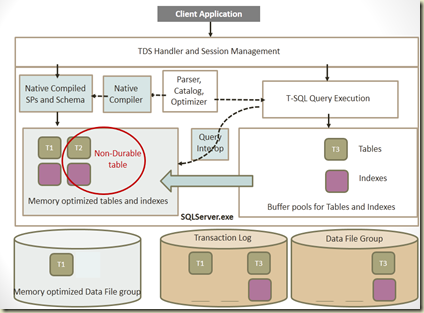
Statistics

Let’s see the code. I have already created a DB called TestDatabase01 and it has a table called dbo.FactSales. This table is from ContosoRetailDW which is available at: http://www.microsoft.com/en-us/download/details.aspx?displaylang=en&id=18279.

First step is enable the database for in-memory tables. It is done by adding a file group specifically for in-memory tables and add a file to it.

ALTER DATABASE [TestDatabase01] ADD FILEGROUP FG_MemoryOptiimizedData 
CONTAINS MEMORY_OPTIMIZED_DATA
GO
 
ALTER DATABASE TestDatabase01 ADD FILE 
    (NAME = 'TestDatabase01_MemoryOptiimizedData'
    , FILENAME = 'C:\Program Files\Microsoft SQL Server\MSSQL11.MSSQLSERVER\MSSQL\DATA\TestDatabase01_MemoryOptiimizedData.ndf') 
TO FILEGROUP FG_MemoryOptiimizedData
GO

Next step is creating tables. This code creates three tables as mentioned above.

-- creating a normal disk table
CREATE TABLE dbo.NewFactSales
    (
        SalesKey int NOT NULL PRIMARY KEY 
        , DateKey datetime NOT NULL
        , channelKey int NOT NULL
        , StoreKey int NOT NULL
        , ProductKey int NOT NULL
        , PromotionKey int NOT NULL
        , CurrencyKey int NOT NULL
        , UnitCost money NOT NULL
        , UnitPrice money NOT NULL
        , SalesQuantity int NOT NULL
        , ReturnQuantity int NOT NULL
        , ReturnAmount money NULL
        , DiscountQuantity int NULL
        , DiscountAmount money NULL
        , TotalCost money NOT NULL
        , SalesAmount money NOT NULL
        , ETLLoadID int NULL
        , LoadDate datetime NULL
        , UpdateDate datetime NULL
    )
GO
 
-- creating an in-memory table.
-- Option DURABILITY = SCHEMA_AND_DATA makes table durable
CREATE TABLE dbo.FactSales_MemoryOptimized_Durable
 
        SalesKey int NOT NULL PRIMARY KEY NONCLUSTERED HASH WITH (BUCKET_COUNT = 3000000)
        , DateKey datetime NOT NULL
        , channelKey int NOT NULL
        , StoreKey int NOT NULL
        , ProductKey int NOT NULL
        , PromotionKey int NOT NULL
        , CurrencyKey int NOT NULL
        , UnitCost money NOT NULL
        , UnitPrice money NOT NULL
        , SalesQuantity int NOT NULL
        , ReturnQuantity int NOT NULL
        , ReturnAmount money NULL
        , DiscountQuantity int NULL
        , DiscountAmount money NULL
        , TotalCost money NOT NULL
        , SalesAmount money NOT NULL
        , ETLLoadID int NULL
        , LoadDate datetime NULL
        , UpdateDate datetime NULL
    )
WITH (MEMORY_OPTIMIZED = ON, DURABILITY = SCHEMA_AND_DATA)
GO
 
-- creating another in-memory table.
-- Option DURABILITY = SCHEMA_ONLY, this is non-durable
CREATE TABLE dbo.FactSales_MemoryOptimized_NonDurable
    (
        SalesKey int NOT NULL PRIMARY KEY NONCLUSTERED HASH WITH (BUCKET_COUNT = 3000000)
        , DateKey datetime NOT NULL
        , channelKey int NOT NULL
        , StoreKey int NOT NULL
        , ProductKey int NOT NULL
        , PromotionKey int NOT NULL
        , CurrencyKey int NOT NULL
        , UnitCost money NOT NULL
        , UnitPrice money NOT NULL
        , SalesQuantity int NOT NULL
        , ReturnQuantity int NOT NULL
        , ReturnAmount money NULL
        , DiscountQuantity int NULL
        , DiscountAmount money NULL
        , TotalCost money NOT NULL
        , SalesAmount money NOT NULL
        , ETLLoadID int NULL
        , LoadDate datetime NULL
        , UpdateDate datetime NULL
    )
WITH (MEMORY_OPTIMIZED = ON, DURABILITY = SCHEMA_ONLY)
GO

Let’s insert records. Insert three statements separately for seeing the difference.

-- Insert into disk table
INSERT INTO dbo.NewFactSales
(
   SalesKey, DateKey, channelKey, StoreKey
   , ProductKey, PromotionKey, CurrencyKey
   , UnitCost, UnitPrice, SalesQuantity, ReturnQuantity
   , ReturnAmount, DiscountQuantity, DiscountAmount
   , TotalCost, SalesAmount, ETLLoadID, LoadDate, UpdateDate
)
SELECT 
   SalesKey, DateKey, channelKey, StoreKey
   , ProductKey, PromotionKey, CurrencyKey
   , UnitCost, UnitPrice, SalesQuantity, ReturnQuantity
   , ReturnAmount, DiscountQuantity, DiscountAmount
   , TotalCost, SalesAmount, ETLLoadID, LoadDate, UpdateDate
FROM dbo.FactSales
 
-- Insert into in-memory durable table
INSERT INTO dbo.FactSales_MemoryOptimized_Durable
(
   SalesKey, DateKey, channelKey, StoreKey
   , ProductKey, PromotionKey, CurrencyKey
   , UnitCost, UnitPrice, SalesQuantity, ReturnQuantity
   , ReturnAmount, DiscountQuantity, DiscountAmount
   , TotalCost, SalesAmount, ETLLoadID, LoadDate, UpdateDate
)
SELECT 
   SalesKey, DateKey, channelKey, StoreKey
   , ProductKey, PromotionKey, CurrencyKey
   , UnitCost, UnitPrice, SalesQuantity, ReturnQuantity
   , ReturnAmount, DiscountQuantity, DiscountAmount
   , TotalCost, SalesAmount, ETLLoadID, LoadDate, UpdateDate
FROM dbo.FactSales
 
-- Insert into in-memory non-durable table
INSERT INTO dbo.FactSales_MemoryOptimized_NonDurable
(
   SalesKey, DateKey, channelKey, StoreKey
   , ProductKey, PromotionKey, CurrencyKey
   , UnitCost, UnitPrice, SalesQuantity, ReturnQuantity
   , ReturnAmount, DiscountQuantity, DiscountAmount
   , TotalCost, SalesAmount, ETLLoadID, LoadDate, UpdateDate
)
SELECT 
   SalesKey, DateKey, channelKey, StoreKey
   , ProductKey, PromotionKey, CurrencyKey
   , UnitCost, UnitPrice, SalesQuantity, ReturnQuantity
   , ReturnAmount, DiscountQuantity, DiscountAmount
   , TotalCost, SalesAmount, ETLLoadID, LoadDate, UpdateDate
FROM dbo.FactSales

My VM is configured with 5.5GB memory. Three INSERT statements took 00:01:46, 00:00:17, and 00:00:09 respectively. As you see clearly, in-memory optimized tables give better performance than disk based tables. Let’s run the same with stored procedures. Below code adds three stored procedures. Note the second and third. Few options have been added to them, making them as natively compiled procedures. In addition to that, isolation level and language options are added too. Currently they are required for these procedures.

Note that current version requires manual statistics updates for in-memory tables.

UPDATE STATISTICS dbo.FactSales_MemoryOptimized_Durable WITH FULLSCAN, NORECOMPUTE
UPDATE STATISTICS dbo.FactSales_MemoryOptimized_NonDurable WITH FULLSCAN, NORECOMPUTE

Now let’s add procedures and run, and see the time each takes.

-- Procedure inserts records to disk table
CREATE PROCEDURE dbo.Insert_FactSales
AS
BEGIN
 
    DECLARE @a int = 4000000
    WHILE (@a < 7000000)
    BEGIN
        INSERT INTO dbo.NewFactSales
            (SalesKey,DateKey,channelKey,StoreKey,ProductKey,PromotionKey,CurrencyKey,UnitCost
            ,UnitPrice,SalesQuantity,ReturnQuantity,ReturnAmount,DiscountQuantity,DiscountAmount
            ,TotalCost,SalesAmount,ETLLoadID,LoadDate,UpdateDate)
        VALUES
            (@a,'2013-01-01',1,1,1,1,1,1
            ,1,1,1,1,1,1
            ,1,1,1,'2013-01-01','2013-01-01')
 
        SET @a = @a + 1
    END
END
GO
 
-- Procedure inserts records to in-memory durable table
CREATE PROCEDURE dbo.Insert_FactSales_MemoryOptimized_Durable
WITH NATIVE_COMPILATION, SCHEMABINDING, EXECUTE AS OWNER
AS
BEGIN ATOMIC
    WITH (TRANSACTION ISOLATION LEVEL = SNAPSHOT, LANGUAGE = N'us_English')
 
    DECLARE @a int = 4000000
    WHILE (@a < 7000000)
    BEGIN
        INSERT INTO dbo.FactSales_MemoryOptimized_Durable
            (SalesKey,DateKey,channelKey,StoreKey,ProductKey,PromotionKey,CurrencyKey,UnitCost
            ,UnitPrice,SalesQuantity,ReturnQuantity,ReturnAmount,DiscountQuantity,DiscountAmount
            ,TotalCost,SalesAmount,ETLLoadID,LoadDate,UpdateDate)
        VALUES
            (@a,'2013-01-01',1,1,1,1,1,1
            ,1,1,1,1,1,1
            ,1,1,1,'2013-01-01','2013-01-01')
 
        SET @a = @a + 1
    END
END
GO
 
-- Procedure inserts records to in-memory non-durable table
CREATE PROCEDURE dbo.Insert_FactSales_MemoryOptimized_NonDurable
WITH NATIVE_COMPILATION, SCHEMABINDING, EXECUTE AS OWNER
AS
BEGIN ATOMIC
    WITH (TRANSACTION ISOLATION LEVEL = SNAPSHOT, LANGUAGE = N'us_English')
 
    DECLARE @a int = 4000000
    WHILE (@a < 7000000)
    BEGIN
        INSERT INTO dbo.FactSales_MemoryOptimized_NonDurable
            (SalesKey,DateKey,channelKey,StoreKey,ProductKey,PromotionKey,CurrencyKey,UnitCost
            ,UnitPrice,SalesQuantity,ReturnQuantity,ReturnAmount,DiscountQuantity,DiscountAmount
            ,TotalCost,SalesAmount,ETLLoadID,LoadDate,UpdateDate)
        VALUES
            (@a,'2013-01-01',1,1,1,1,1,1
            ,1,1,1,1,1,1
            ,1,1,1,'2013-01-01','2013-01-01')
 
        SET @a = @a + 1
    END
END
GO
 
EXEC dbo.Insert_FactSales
EXEC dbo.Insert_FactSales_MemoryOptimized_Durable
EXEC dbo.Insert_FactSales_MemoryOptimized_NonDurable

Again, natively compiled procedures against give better performance than others. Here is the summary;

Insert 3 million records Disk table In-Memory table – Durable In-Memory table - NonDurable
INSERT statement 00:01:46 00:00:17 00:00:09
SP 00:15:19 00:00:19
(Natively Compiled)
00:00:03
(Natively Compiled)

Expect more codes on this with future posts. Code related to this can be downloaded from: http://sdrv.ms/18sAxEa

The presentation used for the session can be downloaded from: http://sdrv.ms/1d2xSoe

SQL 2014 is still being developed. However, for testing purposes, you can download CTP 2 from here: http://technet.microsoft.com/en-us/evalcenter/dn205290.aspx

Here are useful links on this;

Thursday, October 17, 2013

SQL Server 2014 CTP1: Error 41342 - The model of the processor on the system does not support creating filegroups with MEMORY_OPTIMIZED_DATA….

You might have already faced for this, or you will be, if you try to create a file group for your in-memory optimized tables. The reason for this is, in-memory optimized tables require a processor that supports atomic compare and exchange operations on 128-bit values (as per this:http://msdn.microsoft.com/en-us/library/dn232521(v=sql.120).aspx, I do not have much idea on it :)). This requires assembly instruction CMPXCHG16B. Certain models do not support this. Certain virtual environments do not enable this by default.

My virtual environment is VirtualBox. Here is the way of enabling CMPXCHG16B instruction set;

  • Get the list of all VMs configured using VBoxManage.exe list vms
  • Then enable it using VBoxManage.exe setextradata “VM Name” VBoxInternal/CPUM/CMPXCHG16B 1

VirtualBox error

The internal changes on executing this command is unknown. Hence be cautious on this before enabling this in production environments.

Wednesday, October 16, 2013

SQL Server 2014 CTP2 is available for downloading

SQL Server 2014 CTP2 is available for downloading;

http://technet.microsoft.com/en-us/evalcenter/dn205290.aspx

Few important things to remember with this installation;

  • The Microsoft SQL Server 2014 CTP2 release is NOT supported by Microsoft Customer Services and Support (CSS).
  • The Microsoft SQL Server 2014 CTP2 release is available for testing purposes only and should NOT be installed and used in production environments.
    • Side-by-Side installation with down-level production SQL Server instances as well as in-place Upgrades of down-level production SQL Server instances, is NOT supported.
  • Upgrading from Microsoft SQL Server 2014 CTP1 to Microsoft SQL Server 2014 CTP2 is NOT supported.