Thursday, March 12, 2015

Number of records in Non-Clustered Index Leaf Level is same as records in the table?

This is one of the questions I got in last week. To make it more clearer, the question is, when we have 1,000,000 records in a clustered-structure table, are we supposed to see 1,000,000 records in leaf level of all non-clustered indexes, even when index key holds duplicates?

Answer is yes. Here is simple code for showing it. This table has 7,301,921 records and leaf level of clustered index holds 7,301,921 records too.

SELECT COUNT(*) FROM dbo.InternetSales;

SELECT index_id, partition_number, index_type_desc, index_level, record_count
FROM sys.dm_db_index_physical_stats (DB_ID('SalesDB')
 ,OBJECT_ID('dbo.InternetSales'), NULL, NULL, 'DETAILED');


Now, let's create an index on OrderDateKey which contains duplicates.
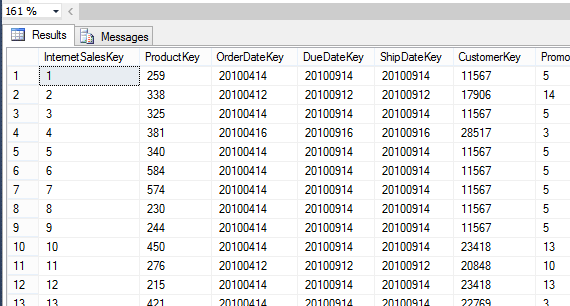

Now if I execute the following code, it will show that number of records in both indexes are same.

CREATE INDEX IX_Sales_OrderDateKey ON dbo.InternetSales (OrderDateKey);
GO

SELECT index_id, partition_number, index_type_desc, index_level, record_count
FROM sys.dm_db_index_physical_stats (DB_ID('SalesDB')
 ,OBJECT_ID('dbo.InternetSales'), NULL, NULL, 'DETAILED');


Sunday, March 8, 2015

SQL Server Brain Basher of the Week #002

Here is the Brain Basher of this week. As you know, if you have multiple objects to be deleted, for an example, 3 tables, we write three statements as below.

DROP TABLE dbo.T1;
DROP TABLE dbo.T2;
DROP TABLE dbo.T3;

Can we write one statement or one command to do this?

Yes, it is possible, as long as they are similar type of objects. All we have to do is, have the command with object names separated with comma. Here is an example.

DROP TABLE dbo.T1, dbo.T2, dbo.T3;

Have a good week ahead!


Saturday, March 7, 2015

How to change the data type of a column of a large table

Here is another common question appeared in forums, how to change the data type of column, specifically a large table. If you search for it, the most common one is, handling this with a new column (which is my 3rd way in the code). However, situation to situation, things can be different, hence tested few ways of changing the type with a table that contains 7 millions records.

Here are 3 ways I tried with. The code uses 3 tables called dbo.Sales_1, dbo.Sales_2, and dbo.Sales_3. The structure and the number of records are same for all 3 tables. Here is the test I did.

-- Method 1
-- ========

-- Check the fragmentation of the table
SELECT * FROM sys.dm_db_index_physical_stats(db_id(), object_id('dbo.Sales_1'), null, null, 'detailed');
-- Result
-- External Fragmentation - 0.3% (Good)
-- Internal Fragmentation - 98% (Good)

-- Changing the column type of Product key from int to bigint
ALTER TABLE dbo.Sales_1
 ALTER COLUMN ProductKey bigint not null;
-- Result
-- Time spent: 4:47

-- Checking fragmentation again
SELECT * FROM sys.dm_db_index_physical_stats(db_id(), object_id('dbo.Sales_1'), null, null, 'detailed');
-- Result
-- External Fragmentation - 99% (Bad)
-- Internal Fragmentation - 51% (Bad)

-- Rebulding the index
ALTER INDEX PK__Sales_1 ON dbo.Sales_1 REBUILD;
-- Result
-- Time spent: 3:43

-- **
-- Total time spent: 8:30
-- **


-- Method 2
-- ========

-- Check the fragmentation of the table
SELECT * FROM sys.dm_db_index_physical_stats(db_id(), object_id('dbo.Sales_2'), null, null, 'detailed');
-- Result
-- External Fragmentation - 0.3% (Good)
-- Internal Fragmentation - 98% (Good)

-- Rebuilding the index with filfactor 80.
ALTER INDEX PK__Sales_2 ON dbo.Sales_2 REBUILD WITH (FILLFACTOR = 80);
GO
-- Result
-- Time spent: 1:38

-- Changing the column type of Product key from int to bigint
ALTER TABLE dbo.Sales_2
 ALTER COLUMN ProductKey bigint not null
-- Result
-- Time spent: 1:13

-- Check for fragmentation
SELECT * FROM sys.dm_db_index_physical_stats(db_id(), object_id('dbo.Sales_2'), null, null, 'detailed');
-- Result
-- External Fragmentation - 0.1% (Good)
-- Internal Fragmentation - 85% (Good)

-- **
-- Total time spent: 2:51
-- **


-- Method 3
-- ========

-- Check the fragmentation of the table
SELECT * FROM sys.dm_db_index_physical_stats(db_id(), object_id('dbo.Sales_3'), null, null, 'detailed');
-- Result
-- External Fragmentation - 0.3% (Good)
-- Internal Fragmentation - 98% (Good)

-- Add a new column with required data type: bigint
-- Setting it as a nullable column
 ALTER TABLE dbo.Sales_3
 ADD NewProductKey bigint null

-- Changing the recovery model
ALTER DATABASE TestDatabase SET RECOVERY Bulk_Logged;

-- Updating the new column with old column value
DECLARE @Count int = 1

WHILE (@Count != 0)
BEGIN

 UPDATE TOP (500000) dbo.Sales_3 WITH (TABLOCK)
  SET NewProductKey = ProductKey
 WHERE NewProductKey IS NULL

 SET @Count = @@ROWCOUNT
END
-- Result
-- Time spent: 1:23

-- Drop the old column
ALTER TABLE dbo.Sales_3
 DROP COLUMN ProductKey

-- Rename the new column as old column
sp_rename 'dbo.Sales_3.NewProductKey', 'ProductKey', 'COLUMN';

-- Alter the current column as non-nullable
ALTER TABLE dbo.Sales_3
 ALTER COLUMN ProductKey bigint NOT NULL
-- Result
-- Time spent: 0.03

-- Check the fragmentation of the table
SELECT * FROM sys.dm_db_index_physical_stats(db_id(), object_id('dbo.Sales_3'), null, null, 'detailed');
-- Result
-- External Fragmentation - 99% (Bad)
-- Internal Fragmentation - 51% (Bad)


ALTER INDEX PK__Sales_3 ON dbo.Sales_4 REBUILD;
-- Result
-- Time spent: 2:55

-- Change back the recovery model
ALTER DATABASE TestDatabase SET RECOVERY Full;

-- **
-- Total time spent: 4:21
-- **

Here is the summary of it;
Method Time Spent Comments
1 - Just alter the column8:30 Takes long time
2 - Alter the column with fill-factor 2:51 Fastest, Probably the best
3 - With a new column 4:21 Good, but need more extra work

My preference is for the highlighted one as it gives the best performance and I do not see any issue with it.

Thursday, March 5, 2015

How to load/insert large amount of data efficiently

Importing data from other sources is a very common operation with most of database solutions as not all data cannot be entered row-by-row. When large amount of data needs to be imported, we always consider about the constraints added to the table and minimal logging expecting improved performance.

SQL Server supports a set of tools for importing data: Import and Export Wizard, bcp (Bulk Copy Program), BULK INSERT, OPENROWSET (BULK). Preference always goes to either bcp or BULK INSERT, however, to improve the performance of it, some of the options have to be considered and set. This post explains how to load a large amount of data using bcp with various options.

For testing the best way, I created a database called TestDatabase and a table called dbo.Sales. I prepared a text file called Sales.txt that has 7,301,921 records matching with dbo.Sales table structure. The Recovery Model of the database is initial set as Full.

Then I loaded the table with following bcp commands. Note that each and every command was run after truncating and shrinking the log file.

--Loding without any specific option
bcp TestDatabase.dbo.Sales in C:\Temp\Sales.txt -S DINESH-PC\SQL2014,8527 -T -c

--Loding with TABLOACK option for forcing to lock the entire table
bcp TestDatabase.dbo.Sales in C:\Temp\Sales.txt -S DINESH-PC\SQL2014,8527 -T -c -h "TABLOCK"

--Loding with our own batch size
bcp TestDatabase.dbo.Sales in C:\Temp\Sales.txt -S DINESH-PC\SQL2014,8527 -T -c -b 3000000 

--Loding with our own batch size and TABLOCK 
bcp TestDatabase.dbo.Sales in C:\Temp\Sales.txt -S DINESH-PC\SQL2014,8527 -T -c -b 3000000 -h "TABLOCK"

Once the table is loaded four times, then the table was loaded again with Bulk Logged recovery model. All commands were executed just like previous one, making sure that log is truncated and shrunk before the execution.

Finally here is the result.

Command  Recovery Model Time (ms) Log file size after loading
With no specific option Full 189,968 3,164,032 KB
With TABLOCK Full 275,500 1,475,904 KB
With batchsize Full 108,500  2,377,088 KB
With batchsize and TABLOCK Full 99,609 1,964,480 KB
With no specific option  Bulk Logged 140,422 3,164,032 KB
With TABLOCK Bulk Logged 239,938 26,816 KB
With batchsize Bulk Logged 121,828 2,377,088 KB
With batchsize and TABLOCK Bulk Logged 86,422 1,475,904 KB

As you see, you can get improved performance in terms of the speed by setting the batch size and tablock with bulk-logged recovery model. If you really consider about log file growth, then tablock option with bulk-logged recovery model is the best.

I believe that BULK INSERT offers the same result, however it is yet to be tested in similar way.

Wednesday, March 4, 2015

SSRS Multi Value Parameters with MDX and checking whether all values are selected

It is a very common question in many forums: How can we check whether all values in the parameter are selected and how to add selected values to a dynamic query that will be used for loading the main dataset. Once I wrote something similar to SQL, here is the link if you need it: http://dinesql.blogspot.com/2011/09/reporting-services-parameters-adding.html

What if you need to generate a dynamic MDX statement for your main dataset and need to get values from a parameter which is formed using a dimension, in to your query. I have seen many different implementations on this: Some have used another hidden parameter for holding the same dataset, and use it for comparing the selection using Iif function for getting the right set. Some have used CountRows functions for comparing number of records in the dataset with number of selected values in the parameter. Most of methods are working fine but there is another easy way of doing it.

If you have built the MDX for the main dataset using the designer, then you know how parameters are handled with it. Designer uses StrToSet MDX function for getting values for multi value parameters. This is the easiest way for handling it and it can be used with dynamic MDX statement too.

Here is an example:

Assume that parameters are loaded using your own query. In that case, you need to use a code like below for loading dimension members.

// There are multiple ways of loading values to parameters
// Either one is okay

// 1.
// This query returns two columns; one for value and one for label
WITH 
 MEMBER [Measures].[ParameterLabel] AS [Dim PoP].[PoP].CurrentMember.Member_Caption 
 MEMBER [Measures].[ParameterValue] AS [Dim PoP].[PoP].CurrentMember.UniqueName
SELECT 
 {[Measures].[ParameterLabel], [Measures].[ParameterValue]} ON 0
 , [Dim PoP].[PoP].[Pop].Members ON 1
FROM [OLAP_Voice];
GO


// 2.
// This query returns only one column
// You need to add two additional calculated fields in the dataset
// 1. Name - ParameterLabel, Value - =Fields!Product.Value
// 1. Name - ParameterValue, Value - =Fields!Product.UniqueName

SELECT {} ON 0
 , [Dim PoP].[PoP].[Pop].Members 
 DIMENSION PROPERTIES MEMBER_CAPTION, MEMBER_UNIQUE_NAME on 1
FROM OLAP_Voice;

Now if you need to check and see whether all values are selected, multiple values are selected or, one value is selected and then use selected one(s) with your main query, without using Iif function, StrToSet can be easily used . This requires two steps;

1. Add a parameter to the main dataset like below;

2. Include the parameter with StrToSet function where you need to have values from the parameter.

" WITH " & 
"  MEMBER [Measures].[Measure1] " & 
"   AS ..... " & 
"  MEMBER [Measures].[Measure2] " & 
"   AS ..... " & 

"  SET [MainSet] " &
"   AS NonEmptyCrossjoin({[Dim Geography].[Country].[Country].Members} " &
"     , StrToSet(@Product) " & // no need to check whether one or many have been selected
"    , { [Dim Department].[Department].[Department].Members} " &


" SELECT " & 
"  {[Measures].[Measure1], [Measures].[Measure2]} ON 0 " & 
"  , {MainSet} ON 1 " & 

" FROM   Cube;"


For more info on StrToSet, read this: https://msdn.microsoft.com/en-us/library/ms144782.aspx


Monday, March 2, 2015

Free Microsoft SQL Server preparation courses at Virtual Academy for exams 464 and 465

Microsoft Virtual Academy has added two new preparation courses for SQL Server exams. Theses two courses cover Developing Microsoft SQL Server Databases (464) and Designing Solutions for SQL Server (465). If you do not like to read articles or books, here is the way of learning areas related to these two exams, all courses are built with videos :).

  1. Developing Microsoft SQL Server Database (464) - 6 modules, approximately 7 hours.
  2. Designing Database Solutions for SQL Server (465) - 5 modules, approximately 6 hours.
In addition to these two, few more preparation courses related to other SQL Server exams are available;

Sunday, March 1, 2015

SQL Server Brain Basher of the Week #001

I have been doing a series of session called SQL Server Brain Basher in SQL Server Sri Lanka User Group (https://www.facebook.com/groups/sqlserveruniverse/) that explains some tricky questions which we cannot answer immediately, unless you have excelled the area related. Thought to have at least one I used before (and planning to use in future) as a blog post in every week, hence, here is the first one which is fairly an easy one.

What would be result of following query?

SELECT 100, 200 '300';

If you are familiar with adding aliases to columns, you can immediately answer. This query returns two columns; first column with value of 100 without a column name, and second with a value of 200 with a column name of 300.


Column alias can be used to relabel column if required. This is really useful if you need to have a different name for the column without having the one coming from the table and name calculated columns. There are multiple ways of adding column aliases, here are some of the ways;

-- Column alias using AS keyword
SELECT 100 AS Column1, 200 AS 'Column2';

-- Column alias with an Equal sign
SELECT Column1 = 100, 'Column2' = 200;

-- Column alias following column name
SELECT 100 Column1, 200 'Column2';

Saturday, February 28, 2015

How to stop users seeing all databases by default

Here is the scenario. You have created a login called "Jane" and have not added to any server role. And you are 100% sure that she has not been given any permission on any database and she has no default database. Here is the statement you use:

CREATE LOGIN Jane
WITH PASSWORD = 'Pa$$w0rd'
, CHECK_POLICY = OFF;

Now she logs into SQL Server as below;


And she sees the object explore. Not only that she can expand the databases node and see databases.


Of course, she cannot go into a database and see the content but this is an issue for many cases, why should we let Jane to see even names of databases?

This becomes possible by default because of the Public server role. By default Public server role has permission on VIEW ANY DATABASE and all Logins are autmatically added to Public role.


If you need to stop this, change this permission like below (you can easily change this using GUI too).

DENY VIEW ANY DATABASE TO Public;

Now Jane cannot see even names of databases unless she has permission on it.


Friday, February 27, 2015

SQL Server Security Concepts: Securables, Pricipals and Permissions

When discussing and learning security related to SQL Server, it is always better to know the key concepts and terms related to it. Some of the concepts are not only related to SQL Server, they are related to almost all applications in terms of security. In simplest way, security is all about allowing someone or something to access a resource and perform actions on it. Here are some terms used when describing it:

Securables
Securable is mainly a resource which we can assign permissions. SQL Server has securables at multiple level of a hierarchical architecture. The hierarchy starts from the server level which includes securables like Endpoints, Logins, Server Roles and Databases. These securables are called as server-level securables as well as server scope securables.

Next level of the hierarchy is the database. Database-level or database scope securables includes items like Users, Database Roles, Certificates and Schemas.

SQL Server includes securables at Schema level too. They are called as schema scope securables that includes resources like Tables, Views, and Procedures.

Principals
The someone or something that perform actions on securables is called as a Principal. There are three types of principals related to SQL Server security: Window's Principals, SQL Server Principals, and Database Principals.

Window's principals and SQL Server principals are considered as server level principals. Windows level principals are generally domain or local server user accounts or groups that are used to connect with SQL Server instance. Authentication is done by either local server or domain controller, and SQL Server trusts the account without performing authentication. SQL Server level principals are logins created at SQL Server instance and authentication is done by SQL Server itself.

Database principals includes database users, database roles and application roles.

** Some principals are also securables. As an example, Login is a principal as well as a securable. It is a principal that because it can access the SQL Server instance and it is also a securable because there are actions that can be performed on it such as enabling and disabling that require permission.

Permissions
Permissions allow principals to perform actions on securables. There are two types of permissions related to SQL Server: Statement permission and Object Permission.

Statement permissions refer actions that can be performed by executing a statement. The principal creating a table using CREATE TABLE statement with CREATE TABLE permission is an example for it.

Object permissions refer actions that can be performed on securables. A principal having SELECT permission on a table is an example for this.

This image shows how these concepts are worked together. Note that the image has been taken from an article in TechNet Magazine. You can refer the article at: https://technet.microsoft.com/en-us/magazine/2009.05.sql.aspx


Tuesday, February 24, 2015

Gartner Magic Quadrant 2015 for Business Intelligence and Analytics Platforms is published

Gartner has released its Magic Quadrant for Business Intelligence and Analytics platforms for 2015. Just like the 2014 one, this shows business intelligence market share leaders, their progress and position in terms of business intelligence and analytics capabilities.

Here is the summary of it;


This is how it was in 2014;


As you see, position of Microsoft has been bit changed but it still in leaders quadrant. As per the published document, main reasons for the position of Microsoft are strong product vision, future road map, clear understanding on market desires, and easy-to-user data discovery capabilities. However, since the Power BI is yet-to-be-completed in terms of complexities and limitations, and its standard-alone version is still in preview stage, including some key analytic related capabilities (such as Azure ML), the market acceptance rate is still low.

You can get the published document from various sites, here is one if you need: http://www.birst.com/lp/sem/gartner-lp?utm_source=Birst&utm_medium=Website&utm_campaign=BI_Q115_Gartner%20MQ_WP_Website

Monday, February 23, 2015

Tools for carrying out performance monitoring and tuning of SQL Server

Regular and well-defined monitoring guarantees smooth running of SQL Server. Based on your goals related to monitoring, you should select the appropriate tools for monitoring. For that you have to know the tools supported by SQL Server. Microsoft SQL Server offers number of tools that can be used for performance monitoring and tuning SQL Server databases. Here is the list of tools available;

  1. Activity Monitor
    This tool can be opened with Management Studio and it gives detail view of current activities. It includes five sections: Overview, Processes, Resource Waits, Data File I/O, Recent Expensive Queries.
    https://msdn.microsoft.com/en-us/library/hh212951.aspx
    http://www.kodyaz.com/sql-server-tools/sql-server-activity-monitor-tool.aspx
    .
  2. Dynamic Management View and Functions
    These views and functions return state information that can be used to monitor the health of the instance, diagnose problems and tune performance. There are two type of views and functions: Server-scoped and Database-scoped. These are one of the best tools for monitoring, specifically on ad-hoc monitoring.
    https://msdn.microsoft.com/en-us/library/ms188754.aspx
    http://download.red-gate.com/ebooks/SQL/eBook_Performance_Tuning_Davidson_Ford.pdf

  3. Performance Monitor
    This Windows administrative tool allows to track resource usage on Microsoft Operating System and can be used to monitor information specific to SQL Server. This is used as a monitoring tool for identifying trends over a period of time and as a ad-hoc monitoring for identifying resource bottleneck responsible for performance issue.
    http://www.brentozar.com/archive/2006/12/dba-101-using-perfmon-for-sql-performance-tuning/
    https://www.youtube.com/watch?v=nAtlan1qgso
    .
  4. SQL Server Profiler
    This graphical tool allows to capture a trace of all events occurred in SQL Server. This is heavily used for seeing current T-SQL activities and captured info can be saved for further analysis. This tool also offers the captured events to be replayed.
    ** This tool has been deprecated in SQL Server 2012, instead use Extended events for capturing and Distributed replay for replaying events.
    https://msdn.microsoft.com/en-us/library/ms181091.aspx
    http://www.codeproject.com/Articles/21371/SQL-Server-Profiler-Step-by-Step
    .
  5. SQL Trace
    This is T-SQL way that provides same SQL Server Profiler tracing facility. Since it does not provide GUI, it is bit difficult to set it up but it is not as heavy as Profiler and leverages T-SQL features.
    https://technet.microsoft.com/en-us/library/ms191006(v=sql.105).aspx
    http://blogs.msdn.com/b/sqlsecurity/archive/2008/12/12/how-to-create-a-sql-trace-without-using-sql-profiler.aspx
    .
  6. Database Engine Tuning Advisor
    This tool facilitates getting queries or workload analyzed and getting recommendations on indexes and statistics. This is a useful tool for determining the best index for queries and identifying less-efficient indexes added.
  7. Distributed Replay
    This is an advanced tool that support replaying captured workload across distributed set of servers. This is useful for accessing the impact of SQL Sever upgrades, hardware upgrades and operating system upgrades.
    https://msdn.microsoft.com/en-us/library/ff878183.aspx
    http://blogs.msdn.com/b/mspfe/archive/2012/11/08/using-distributed-replay-to-load-test-your-sql-server-part-1.aspx
    https://msdn.microsoft.com/en-us/library/ee210548.aspx

    .
  8. SQL Server Extended Events
    This is a highly scalable and configurable architecture that offers a lightweight system with an UI for collecting information to troubleshoot SQL Server.
    https://technet.microsoft.com/en-us/library/bb630354(v=sql.105).aspx
    https://www.simple-talk.com/sql/database-administration/getting-started-with-extended-events-in-sql-server-2012/

    .
  9. SQL Server Data Collection
    This is an automated system for collecting and storing and reporting performance data for multiple SQL Server instances.
    https://msdn.microsoft.com/en-us/library/bb677179.aspx
    http://blog.sqlauthority.com/2010/04/13/sql-server-configure-management-data-collection-in-quick-steps-t-sql-tuesday-005/

    .
  10. SQL Server Utility Control Point
    This is a centralized management portal for monitoring multiple instances of SQL Server based on specific collection sets.
    https://technet.microsoft.com/en-us/library/ee210548(v=sql.120).aspx
    http://sqlmag.com/sql-server-2008/introducing-sql-server-utility.
    .
  11. Microsoft System Center Operations Manager
    This is an enterprise level infrastructure management solution that uses management packs to collect performance and health info from windows and application services such as SQL Server. SQL Server has a management pack that enables to create exception-driven events for resolving specific issues.
    http://channel9.msdn.com/Events/TechEd/NorthAmerica/2014/DCIM-B419#fbid=
    http://www.microsoft.com/en-us/download/details.aspx?id=10631

Friday, February 20, 2015

Does my table hold invalid data after importing data? Constraints have been violated?

It is rare to see a table without at least one constraint because constraints are required to manage data integrity rules. Although we add constraints, for certain scenario, we disable constraints as a temporary measure for increasing the performance of data importing. Keeping constraints enabled makes sure that no invalid records are inserted to the table but this slows down the entire loading process as each and every value has to be validated against the constraints. Because of this, rather than checking each value during the importing process, we disable constraints, complete the importing process and then enable constraints either checking all values loaded against the constraints or checking none of the values loaded against the constraints. Enabling without checking loaded values improves the overall performance but this can result the table holding invalid data, hence this should be done only when data can be trusted. 

However, if data has been loaded by disabling constraints and later constraints have been enabled without checking loaded values, and you need know whether constraints have been enabled without checking loaded values, specifically on foreign key and check constraints, how do you do it?

It can be done using two catalog views: sys.check_constraints and sys.foreign_keys. Both return a column called is_not_trusted and 1 indicates that rows have been inserted or updated without getting values validated against constraints. Although this indicator does not say that table hold invalid data, it gives an indication on possibilities of having invalid data, hence it is always better to have this checking as a part of routine checkup. And do not forget, "not trusted" constraints will lead to poorly-optimized query execution plans for queries running against tables with "not trusted" constraints.

Here is a sample code that shows the way of checking CHECK constraints with sys.check_constraint catalog view.

-- Create a table with a check constraint
USE tempdb;
GO

CREATE TABLE dbo.Customer
(
 CustomerId int not null
 , CustomerName varchar(10) not null
 , CreditAmount decimal(18,2) not null
 , CONSTRAINT Customer_SalaryCheck CHECK (CreditAmount < 100000)
);
GO

-- Inserting valid data
INSERT INTO dbo.Customer
 VALUES (1, 'Joe Brown', 65000);
INSERT INTO dbo.Customer
 VALUES (2, 'Mary Smith', 75000);


-- Inserting invalid data
-- This will not be possible as it violates the constraint
INSERT INTO dbo.Customer
 VALUES (3, 'Joe Brown', 110000);


-- Disabling the constraint and inserting the same again
-- Now it allows to insert a row with an invalid value
ALTER TABLE dbo.Customer NOCHECK CONSTRAINT Customer_SalaryCheck;
GO

INSERT INTO dbo.Customer
 VALUES (3, 'Joe Brown', 110000);
GO


-- Enabling the constraint.
-- Note that updated records are not validated
ALTER TABLE dbo.Customer CHECK CONSTRAINT Customer_SalaryCheck;
GO
-- Now table contains invalid data.

-- Checking with sys.check_constraints catalog view.
SELECT name, is_not_trusted FROM sys.check_constraints
WHERE parent_object_id  = OBJECT_ID('dbo.Customer');
-- This shows the value of is_not_trusted as 1
-- indicating that table might contain invalid data

-- Query the table and see. This shows 3 records including the invalid row.
SELECT * FROM dbo.Customer;
GO

-- If you want to make sure no invalid data exist
-- and validate all records agains the constraint
-- disable it again and enable it with CHECK option
ALTER TABLE dbo.Customer NOCHECK CONSTRAINT Customer_SalaryCheck;
GO

ALTER TABLE dbo.Customer WITH CHECK CHECK CONSTRAINT Customer_SalaryCheck;
GO
-- This will throw and error because current rowset has an invalid value.
-- This can be corrected by either updating it or deleting it.
DELETE FROM dbo.Customer WHERE CustomerId = 3;

-- Now constraint can be enabled with CHECK option
ALTER TABLE dbo.Customer WITH CHECK CHECK CONSTRAINT Customer_SalaryCheck;
GO
-- And if you run sys.check_constraint again, you will see 0 for is_not_trusted column.

Wednesday, February 18, 2015

SSAS: How to find User-Defined Member Properties of a dimension?

User-Defined Member Properties are attribute relationships added to specific named level in a dimension. Once defined, they can be access using either PROPERTIES key word or Properties function. Here is and example of accessing a user-defined properties.

-- from MSDN
SELECT 
   CROSSJOIN([Ship Date].[Calendar].[Calendar Year].Members, 
             [Measures].[Sales Amount]) ON COLUMNS,
   NON EMPTY Product.Product.MEMBERS
   DIMENSION PROPERTIES 
              Product.Product.[List Price],
              Product.Product.[Dealer Price]  ON ROWS
FROM [Adventure Works]
WHERE ([Date].[Month of Year].[January]) 


However, if you do not know all user-defined properties added and need to get a list, you can simply use Analysis Services Schema Rowsets for querying out information such as objects, state, sessions, connections, etc. There are many schema rowset under OLEDB for OLAP Schema Rowsets and the one we have to use is MDSCHEMA_PROPERTIES. Here is the query for getting all user-defined properties of a level in a dimension.

SELECT *
FROM $SYSTEM.MDSCHEMA_PROPERTIES
WHERE [DIMENSION_UNIQUE_NAME] = '[Dim Customer]'
 AND [HIERARCHY_UNIQUE_NAME] = '[Dim Customer].[Customer]'
 AND [LEVEL_UNIQUE_NAME] = '[Dim Customer].[Customer].[Customer]'
 AND [PROPERTY_TYPE] = 1;

Read more on Analysis Services Schema Rowsets: https://msdn.microsoft.com/en-us/library/ms126233.aspx
Read more on OLE DB for OLAP Schema Rowsets: https://msdn.microsoft.com/en-us/library/ms126079.aspx

Tuesday, February 10, 2015

Reading the content of the databse while restoring backup-sets: Restore with STANDBY

Assume that you have multiple transaction log backups that have been taken every hour, starting from 9am to 5pm, and you need to restore the database up to a certain set of transactions that have been happened during the day, how do you do it? If you do not know the exact time-tag of the transactions and no name given for the transactions, then restore with STOPAT or STOPATMARK is not possible. Since we cannot read the content of the database during the restore process, only way to figure it out is, restore one set (full database backup and 9am transaction log backup), complete and read the content. If the required content is not there, then restore the again with another set (full database backup, 9am transaction log backup and 10am transaction log backup). Again, If the required content is not there, then restore the again with another set (full database backup, 9am transaction log backup, 10am transaction log backup, and 11am transaction log backup). This unnecessary, time-consuming process has to be continued until you see your transactions in the database. What if SQL Server allows you to see the content during the restoration that helps you to identifying the last transaction log backup to be restored?

If you have more than one backup-set to be restored, all backup-sets should be restored with NORECOVERY option except the last one. Last one should be restored with RECOVERY option. Until that database remains Recovering state which blocks users connecting with it. Simply NORECOVERY option does not allow users to access the database until a backup-set is restored with RECOVERY. However, using STANDBY option instead NORECOVERY allows you to read the content of the database between transaction log restores.

Generally, SQL Server rolls back uncommitted transactions at the end of restore process with RECOVERY option to make the database readable. The STANDBY option also rolls back uncommitted transactions but keeps all the information needed for "undo" process which will allow for further restore. This basically allows you to read the content of the database after one transaction log restoration, without completing the restore process. Since it keeps necessary information for "undo" process, if required content is not available in the database, you can continue the restore process with additional transaction log backups.

This option is the best way of restoring the database for above-mentioned situation.

Here is a sample code for understanding restore operation with STANDBY option.

Backing up the database with full and multiple transactions log backups.

-- Creating a database for testing
USE master;
GO

IF EXISTS (SELECT * FROM sys.databases WHERE name = 'TestDatabase')
 DROP DATABASE TestDatabase;
GO

CREATE DATABASE TestDatabase
ON PRIMARY
(
 NAME = N'TestDatabase_Data'
 , FILENAME = 'C:\Program Files\Microsoft SQL Server\MSSQL12.SQL2014\MSSQL\DATA\TestDatabase_Data.mdf'
 , SIZE = 10240KB, FILEGROWTH = 1024KB
)
LOG ON
(
 NAME = N'TestDatabase_Log'
 , FILENAME = 'C:\Program Files\Microsoft SQL Server\MSSQL12.SQL2014\MSSQL\DATA\TestDatabase_Log.ldf'
 , SIZE = 5120KB, FILEGROWTH = 10%
);
GO

-- Changing the recovery model to full
ALTER DATABASE TestDatabase SET RECOVERY FULL;
GO

-- Take the initial backup
BACKUP DATABASE TestDatabase
 TO DISK = 'C:\Program Files\Microsoft SQL Server\MSSQL12.SQL2014\MSSQL\Backup\TestDatabase.bak'
WITH INIT;
GO

-- create a table for testing purposes
USE TestDatabase;
GO

CREATE TABLE dbo.TestTable
(
 Id int identity(1,1) PRIMARY KEY
 , StringColumn nvarchar(600)
 , IntColumn bigint
);
GO

-- Insert the first record
INSERT INTO dbo.TestTable
 (StringColumn, IntColumn)
VALUES ('This is the first data', 12345);

-- Check records. You should see one record
SELECT * FROM dbo.TestTable

-- Perform first transaction log backup
-- This backup contains our first record inserted
BACKUP LOG TestDatabase
 TO DISK =
 'C:\Program Files\Microsoft SQL Server\MSSQL12.SQL2014\MSSQL\Backup\TestDatabase_log.trn'
WITH INIT;
GO

-- Insert the second record
INSERT INTO dbo.TestTable
 (StringColumn, IntColumn)
VALUES ('This is the second data', 12345);

-- Check records. You should see two records now
SELECT * FROM dbo.TestTable

-- Perform the second transaction log backup
-- This backup contains first and second records inserted
BACKUP LOG TestDatabase
 TO DISK = 'C:\Program Files\Microsoft SQL Server\MSSQL12.SQL2014\MSSQL\Backup\TestDatabase_log.trn'
WITH NOINIT;
GO

-- Insert the third record
INSERT INTO dbo.TestTable
 (StringColumn, IntColumn)
VALUES ('This is the third data', 12345);

-- Check records. You should see three records now
SELECT * FROM dbo.TestTable

-- Perform the third transaction log backup
-- This backup contains first, second and third records inserted
BACKUP LOG TestDatabase
 TO DISK = 'C:\Program Files\Microsoft SQL Server\MSSQL12.SQL2014\MSSQL\Backup\TestDatabase_log.trn'
WITH NOINIT;
GO


Assume that we need to restore up to the second record and we do not know the exact time which record was inserted, and we do not know which transaction log backup holds it. Then only option is, using STANDBY option, here is the way of doing it.

-- Restoring the full backup
USE master;
GO

RESTORE DATABASE TestDatabase
 FROM DISK = 'C:\Program Files\Microsoft SQL Server\MSSQL12.SQL2014\MSSQL\Backup\TestDatabase.bak'
WITH REPLACE, NORECOVERY;
GO

-- Check the state of the database
-- This will show as "Restoring"
SELECT 
 name, state_desc
FROM sys.databases
WHERE name = 'TestDatabase';
GO

-- Restore first log with STANDBY instead NORECOVERY
RESTORE DATABASE TestDatabase
 FROM DISK = 'C:\Program Files\Microsoft SQL Server\MSSQL12.SQL2014\MSSQL\Backup\TestDatabase_log.trn'
WITH FILE =1, STANDBY = 'C:\Program Files\Microsoft SQL Server\MSSQL12.SQL2014\MSSQL\Backup\ROLLBACK_UNDO_TestDatabase_.bak';
GO

-- Read the state of the database
-- Now you will see that it is "online".
-- But remember, now the database is read-only.
-- Have a look on it with Object Explorer, you will the state.
SELECT 
 name, state_desc
FROM sys.databases
WHERE name = 'TestDatabase';
GO

-- Read the table
USE TestDatabase;
GO

SELECT * FROM dbo.TestTable;
-- We see the first record, but we need the second record.
-- Now let's try with our second log backup.


USE master;
GO

RESTORE LOG TestDatabase
 FROM DISK = 'C:\Program Files\Microsoft SQL Server\MSSQL12.SQL2014\MSSQL\Backup\TestDatabase_log.trn'
WITH FILE =2, STANDBY = 'C:\Program Files\Microsoft SQL Server\MSSQL12.SQL2014\MSSQL\Backup\ROLLBACK_UNDO_TestDatabase_.bak';
GO

-- Again, let read the table
USE TestDatabase;
GO

SELECT * FROM dbo.TestTable;
-- As you see, we have the required record.
-- No need to continue the restore operation.
-- Let's complete the restore process

USE master;
GO

RESTORE DATABASE TestDatabase WITH RECOVERY;

-- Done.


Tuesday, January 27, 2015

How to find the protocol used by the connetion

As you know SQL Server supports three types of protocols, or we can called them as SNI Transport Providers, for communicating with a SQL Server instance. How do we know what SNI Transport Provider is being used for our connection?

Details of the connection established can be obtained from sys.dm_exec_connections dynamic management view. Here is the result of it with for a connection established to local instance.

 SELECT CONVERT(nvarchar(128), SERVERPROPERTY('SERVERNAME')) ServerConnected, *  
 FROM sys.dm_exec_connections 
 WHERE session_id = @@SPID;


Since all protocols are enabled and connection made to a local instance, as you see, Connection uses Shared Memory as the protocol. Here is the result when only Named Pipes is enabled.


With TCP/IP enabled;


Tuesday, January 20, 2015

Log is getting automatically truncated with FULL Recovery Model

General understanding regarding the log file (ldf) is, it is getting automatically truncated when the Recovery Model is set to SIMPLE and it needs transaction log backup to be taken for truncating when the Recovery Model is set to FULL. Once the transaction log is truncated only, the unused space can be released back to the operating system.

Can there be a situation where the log is getting automatically truncated even with FULL Recovery Model? Yes, it is possible. Here is the code that shows it;

This code snippet creates two databases called Database_SIMPLERecovery and Database_FULLRecovery. Recovery model of first is set as SIMPLE and second set to FULL. Note that initial log file size is 1MB.


-- 1.
-- Creating a database with SIMPLE recovery model
USE master;
GO

IF EXISTS (SELECT * FROM sys.databases WHERE name = 'Database_SimpleRecovery')
 DROP DATABASE Database_SimpleRecovery
GO
CREATE DATABASE [Database_SimpleRecovery]
 CONTAINMENT = NONE
 ON  PRIMARY 
( NAME = N'Database_SimpleRecovery', 
 FILENAME = N'C:\Program Files\Microsoft SQL Server\MSSQL12.SQL2014\MSSQL\DATA\Database_SimpleRecovery.mdf' 
 , SIZE = 3072KB , FILEGROWTH = 1024KB )
 LOG ON 
( NAME = N'Database_SimpleRecovery_log', 
 FILENAME = N'C:\Program Files\Microsoft SQL Server\MSSQL12.SQL2014\MSSQL\DATA\Database_SimpleRecovery_log.ldf' 
 , SIZE = 1024KB , FILEGROWTH = 10%)
GO
ALTER DATABASE [Database_SimpleRecovery] SET RECOVERY SIMPLE 
GO


-- 2.
-- Creating a database with FULL recovery model
USE master;
GO

IF EXISTS (SELECT * FROM sys.databases WHERE name = 'Database_FullRecovery')
 DROP DATABASE Database_FullRecovery
GO
CREATE DATABASE [Database_FullRecovery]
 CONTAINMENT = NONE
 ON  PRIMARY 
( NAME = N'Database_FullRecovery', 
 FILENAME = N'C:\Program Files\Microsoft SQL Server\MSSQL12.SQL2014\MSSQL\DATA\Database_FullRecovery.mdf' 
 , SIZE = 3072KB , FILEGROWTH = 1024KB )
 LOG ON 
( NAME = N'Database_FullRecovery_log', 
 FILENAME = N'C:\Program Files\Microsoft SQL Server\MSSQL12.SQL2014\MSSQL\DATA\Database_FullRecovery_log.ldf' 
 , SIZE = 1024KB , FILEGROWTH = 10%)
GO
ALTER DATABASE Database_FullRecovery SET RECOVERY FULL 
GO


Let's add some records to these two databases and check the space used by log files.

-- Adding some transactions to Database_SimpleRecovery 
USE Database_SimpleRecovery;
GO

SELECT *
INTO dbo.TestTable
FROM AdventureWorksDW2014.dbo.FactInternetSales2;

-- Checking for freespace in the log
SELECT DB_NAME() AS DatabaseName, 
 name AS FileName, 
 size/128.0 AS CurrentSizeMB,  
 size/128.0 - CAST(FILEPROPERTY(name, 'SpaceUsed') AS int)/128.0 AS FreeSpaceMB 
FROM sys.database_files; 


-- Adding some transactions to Database_FullRecovery 
USE Database_FullRecovery;
GO

SELECT *
INTO dbo.TestTable
FROM AdventureWorksDW2014.dbo.FactInternetSales2;

-- Checking for freespace in the log
SELECT DB_NAME() AS DatabaseName, 
 name AS FileName, 
 size/128.0 AS CurrentSizeMB,  
 size/128.0 - CAST(FILEPROPERTY(name, 'SpaceUsed') AS int)/128.0 AS FreeSpaceMB 
FROM sys.database_files; 


Note the free-space in both log files. Although the files sizes have gone up, no active transactions, they have been truncated, more free-space, hence free-space can be released (You might not see the same free-space immediately if CHECKPOINT process has not been run. If so, wait for few seconds and query for space again). However, when the database is in FULL recovery model, transactions should not be truncated until a transaction log backup is performed. What is the issue with second database?

There can be two more reasons for getting transaction log automatically truncated;
  1. Full database backup has never been taken.
  2. Full or differential backup has never been taken after switching from SIMPLE to FULL recovery model.
Since we have not taken a backup, our second database log is getting automatically truncated. Let's take a full backup and then do the same and see.

-- Connecting with Database_FullRecovery
USE Database_FullRecovery;
GO

-- Dropping table
DROP TABLE dbo.TestTable;
GO

-- Taking full backup
BACKUP DATABASE Database_FullRecovery
TO DISK = 'C:\Program Files\Microsoft SQL Server\MSSQL12.SQL2014\MSSQL\Backup\Database_FullRecovery.bak';
GO

-- Loading data again
SELECT *
INTO dbo.TestTable
FROM AdventureWorksDW2014.dbo.FactInternetSales2;

-- Checking for freespace in the log
SELECT DB_NAME() AS DatabaseName, 
 name AS FileName, 
 size/128.0 AS CurrentSizeMB,  
 size/128.0 - CAST(FILEPROPERTY(name, 'SpaceUsed') AS int)/128.0 AS FreeSpaceMB 
FROM sys.database_files; 


As you see, not much free-space in the file now, means log has not been truncated. All you have remember is, in a scenario like this, log gets automatically truncated, which is not acceptable with FULL recovery model and should be avoided. If you need to see whether your database log file is getting automatically truncated with FULL recovery model, use sys.database_recovery_status to see last_log_backup_lsn column. If the column is NULL, then it indicates that the log is getting automatically truncated.

SELECT * FROM sys.database_recovery_status
WHERE database_id = DB_ID();


Saturday, January 3, 2015

Non Reversible Encryption with SQL Server: HASHBYTES function

Not all cipher texts are required to be converted back to plain texts. Good example is "passwords". All we need with non reversible encryption is, store them in encrypted format and perform comparison when required. What is the best way of implementing this with SQL Server?

SQL Server provides number of functions that can be used for encrypting plain texts using different mechanisms. Most of the functions allow you to encrypt and then decrypt them back to plain text. Examples for these functions are "ENCRYPTBYKEY" and "ENCRYPTBYCERT". If decryption is not required or the requirment is non reversible encryption, then the best function to be used is "HASHBYTES".

HASHBYTES returns the hash of given clear text based on the algorithm used. Algorithms supported are: MD2, MD4, and MD5 (128 bits (16 bytes)); SHA and SHA1 (160 bits (20 bytes)); SHA2_256 (256 bits (32 bytes)), and SHA2_512 (512 bits (64 bytes)). SHA2_256 and SHA2_512 available only with SQL Server 2012 and above.


Though we have been given many algorithms for this, most of them are susceptible for several attacks and no longer considered as secured cryptography algorithm. Some of them are known to "collisions" that generate same output for different inputs. If you are using a version before 2012, best is SHA1 even though it has been marked for "collisions". If the version of SQL Server is 2012 or above, best is either SHA2_256 or SHA2_512.

Here is a sample code that shows the usage of HASHBYTES;

This code creates a table and inserts two records.
-- Creating table
IF OBJECT_ID('dbo.UserCredential', 'U') IS NOT NULL
 DROP TABLE dbo.UserCredential
GO
CREATE TABLE dbo.UserCredential
(
 UserId int identity(1,1) PRIMARY KEY
 , UserName varchar(20) NOT NULL
 , Password binary(64) NOT NULL
)
GO

-- Inserting records
INSERT INTO dbo.UserCredential
 (UserName, Password)
VALUES
 ('Dinesh', HASHBYTES('SHA2_512', 'Pa$$w0rd'))
 , ('Yeshan', HASHBYTES('SHA2_512', 'P@$$w0rD'))

-- Checking records inserted
SELECT * FROM dbo.UserCredential;


Since the cipher text cannot be reverted back with HASHBYTES, here is the way of doing the comparison.

-- Validating user
IF EXISTS (SELECT * FROM dbo.UserCredential
   WHERE UserName = 'Yeshan'
    AND Password = HASHBYTES('SHA2_512', 'P@$$w0rD'))
 Print 'User authenticated'
ELSE
 Print 'Invalid user!'


Thursday, January 1, 2015

CONVERT returns '*' - [Happy New Year]

Let's start with a simple thing in 2015. Why we get '*' when converting one type to another? If you have already experienced it, then you know the reason, if not here is the reason;

DECLARE @Integer int = 123;

SELECT 'My Integer is ' + CONVERT(char(2), @Integer);
GO

Analyze the code above, as you see, CONVERT function returns '*' instead of '12'. This could happen with conversion because when converting from one type to another, data may be truncated, might be appeared as cut-off, or an error could be thrown because the new type is not fit enough to display the result. The conversion in the above code tries to convert 123 into char(2) which is too small to hold the value, hence displays '*'.

However, this behavior depends on the types involved. If you are converting varchar(3) to char(2), do not expect '*' but a cut-off value.

And all SQL lovers and my followers;


Sunday, October 12, 2014

Automated notifications on SQL Server errors

Can SQL Server send a notification to me when a deadlock is occurred? Can SQL Server alert me when a database starts suffering with resource issues? I am sure that you have already gone through these type of requirements and I am sure that you have already implemented a mechanism for getting alerts. However, how it has been implemented? Using set of codes? Using Agent Jobs? You may have used a different approach but that is what I have seen with many, nothing wrong with it unless you need more details, run through some logic and have a great flexibility. If all you want is, just to get an "Alert", why do not you use "SQL Server Alerts"?

SQL Server Alerts
SQL Server Alert is a predefined response to an event. You can create an alert configuring it as a "SQL Server event alert", "SQL Server performance condition alert", or "WMI event alert". In order to create an alert for errors, "SQL Server event alert" should be selected. It allows us to create a response to individual error or to all errors of a specific severity level. For example, if you want to get an alert on file growth issues, you can create the Alert for error number 1105 which come under 17 severity level. If you want to get this alert not only for 1105 but for all errors that come under 17, create the alert for severity 17. Here is the way of creating an alert for 1105;


Once the alert is created, an action has to be added for responding to the event. There are two types of actions that can be configured; Execute a Job, Notify Operators. Since the post is speaking about notifications, let's see how to configure the action for notifying a person.

SQL Server Operators
The easiest way of notifying a person is, setting it up via an operator. The SQL Server Agent Operator is a person or group that can receive notifications from an alert or job. Let's create an operator.


As you see, "Database Administrator" operator has been configured with "Email name" notification option. Note that, in order to send emails by SQL Server, Database Mail has to be configured. Let's go back to the Alert and configure the "Response".


We need to do one more configuration for receiving alerts. You need to enable "Enable mail profile" of "Alert System" that comes under SQL Server Agent properties.


All okay now. Let's test and see whether administrator gets the error via an email. Below code creates a database with 4mb size data file and disables "File Growth" of it. Next it inserts bunch of records until the data file gets fully filled. Once the data file is full, SQL Server throws an error with 1105.

-- Create new DB called 'AlertTestDB"
USE master;
GO
CREATE DATABASE [AlertTestDB]
 CONTAINMENT = NONE
 ON  PRIMARY 
( NAME = N'AlertTestDB'
 , FILENAME = N'C:\Program Files\Microsoft SQL Server\MSSQL11.SQL2012\MSSQL\DATA\AlertTestDB.mdf' 
 , SIZE = 4096KB 
 , MAXSIZE = UNLIMITED
 , FILEGROWTH = 0)
 LOG ON 
( NAME = N'AlertTestDB_log'
 , FILENAME = N'C:\Program Files\Microsoft SQL Server\MSSQL11.SQL2012\MSSQL\DATA\AlertTestDB_log.ldf' 
 , SIZE = 1024KB 
 , MAXSIZE = 2048GB 
 , FILEGROWTH = 10%)
GO

-- Connnect and create a table
USE AlertTestDB;
GO

CREATE TABLE TestTable
(
 Id int identity(1,1) PRIMARY KEY
 , Column1 char(2000)
);
GO

-- Insert record until Sever throws an error
SET NOCOUNT ON;

WHILE 1=1
BEGIN

 INSERT INTO TestTable (Column1) VALUES ('test data');
END;
GO

Once the code is executed, following error will be thrown


and administrator automatically receives an email like this.


Monday, October 6, 2014

MDX: Get last 24 hours periods

Date and Time Dimensions Most of analysis and reporting requirements include a need to aggregate values over time period and this leads us to have date and time dimension tables in our data warehouses. Some designers combine attributes related date and time into one dimension table but most recommended implementation is having two tables; one for date and another for time. Most importantly, no foreign key relationship exist between these two tables.

image

Surrogate Key and Granularity
Surrogate key is very common with data warehouse dimension tables (See why we need surrogate keys). However, specifically for Date dimension table, rather than the general integer value with no semantic meaning, it is always better to have a numeric which is concatenation of each date part. For example, the key of 7th of July, 2006 is 20060707. Time dimension can use general integer values for keys as other usual dimensions with one exception which is the starting value. Make sure that the starting value of the key is 0 for time 00:00:00. Here are sample data for both tables;

image

Last 24-hours periods
One of the common reporting requirements related to date and time is, getting values for last 24 hours period.  Although there are many ways of getting the required result, having the above structure for both Date and Time Dimensions definitely offers most easiest ways. Here is one way;
Assume that today is 7th of July 2006 and time is 09:34:45. If I need “Sales Amount” for last 24 hours, all I have to do is, add a slicer that represents last 24 hours.

image

As you see, the slicer is formed with two tuples and each has two coordinates. First tuple represents today’s date for time periods starting with 00:00:00 to 09:34:45. The second tuple represents yesterday with time periods starting with 09:34:46 to 23:59:59. See the result;

image

Now all we have to do is, build the slicer dynamically. Here is the way. Note that I have used Now function for getting current date and time, Cstr function for converting string values to numeric and StrToMember for converting a string to MDX member.

SELECT  {[Measures].[Sales Amount] } ON 0
 , NON EMPTY {([Order Date].[Year - Quarter - Month - Date].[Date], [Time].[Time].[Time]) }  ON 1
FROM 
 (SELECT {(StrToMember( "[Order Date].[Date].&[" + Format(Now(), 'yyyyMMdd')   + "]") 
   , [Time].[Time].&[0]:StrToMember( "[Time].[Time].&[" 
     + Cstr((Format(Now(), 'HH') * 60 * 60 ) + (Format(Now(), 'mm') * 60 ) + (Format(Now(), 'ss') ))
     + "]"))
  , (StrToMember( "[Order Date].[Date].&[" + Format(Now() -1, 'yyyyMMdd')   + "]") 
   ,StrToMember( "[Time].[Time].&["
    + Cstr((Format(Now(), 'HH') * 60 * 60 ) + (Format(Now(), 'mm') * 60 ) + (Format(Now(), 'ss') ) + 1)
    + "]"):[Time].[Time].&[86399])} ON 0
  FROM [Sales]);

Monday, September 1, 2014

Cumulative Update 1 for SQL Server 2012 SP2

Microsoft has released Cumulative Update 1 for SQL Server 2012 Service Pack 2 and it is available for downloading.

Here is the link for downloading: http://support.microsoft.com/hotfix/KBHotfix.aspx?kbnum=2976982&kbln=en-us

Here is the link for the list of bugs fixed:http://support.microsoft.com/kb/2976982

Read this for understanding versions and service packs released for all SQL Server versions:http://dinesql.blogspot.com/2014/01/versions-and-service-packs-of-sql.html

SQL Server 2014 Sample Databases and applications

Are you looking for SQL Server 2014 AdventureWorks databases and applications? It is now available and here is the link:

https://msftdbprodsamples.codeplex.com/releases/view/125550