Saturday, February 15, 2014

What is the difference between CROSS APPLY and OUTER APPLY?

Processing rows in one set using another set is a common coding pattern used mostly with combining or comparing rows from sets. SQL Server offers three set operators: UNION, INTERSECT and EXCEPT, for handling scenario which compares rows from one set to another and completes the return set. In some specific cases, an alternative operator which is APPLY can be used for handling similar scenario. Here is post on APPLY operator;

The APPLY operator not exactly a set operator. It is a table operator which evaluates rows in one set based on an expression set with another set, NOT combining two sets in similar manner used by other set operators but like a JOIN. It is used with FROM clause and just like JOINs, two sets are marked as “left” set and “right” set. The “right” set is always either a table-valued function or a derived table which gets processed for each row returning from the “left” set. The syntax for APPLY is as follows;

SELECT <column list>
FROM <left-table> AS <alias>
APPLY <derived table | table-valued function> AS <alias>

There are two types of APPLY: CROSS APPLY and OUTER APPLY.

CROSS APPLY
CROSS APPLY processes the “right” set for each row found in the “left” set in a similar CROSS-JOIN manner. However, if an empty result is generated by the “right” set for the correlated row given by “left”, the row will NOT be included in the resultset, in a similar INNER-JOIN fashion. Here is an example for CROSS APPLY.

  1. USE AdventureWorks2012
  2. GO
  3.  
  4. -- This returns all products
  5. -- There are 504 products
  6. SELECT ProductID, Name
  7. FROM Production.Product
  8. ORDER BY ProductID
  9. GO
  10.  
  11. -- Create a table-valued function that returns top orders related to given product
  12. CREATE FUNCTION dbo.GetTopOrdersForTheProduct (@ProductId int)
  13. RETURNS TABLE
  14. AS
  15. RETURN
  16.     SELECT TOP (2) h.SalesOrderNumber, h.OrderDate, (d.OrderQty * d.UnitPrice) OrderAmount
  17.     FROM Sales.SalesOrderHeader h
  18.         INNER JOIN Sales.SalesOrderDetail d
  19.             ON h.SalesOrderID = d.SalesOrderID
  20.     WHERE ProductID = @ProductId
  21.     ORDER BY (d.OrderQty * d.UnitPrice) DESC
  22. GO
  23.  
  24. -- check the function
  25. -- this does not return any records as there are no order for the product id 1
  26. SELECT * FROM dbo.GetTopOrdersForTheProduct (1)
  27. -- this returns records as there are orders for the product 707
  28. SELECT * FROM dbo.GetTopOrdersForTheProduct (707)
  29.  
  30. -- Joining SELECT with TVF using CROSS APPLY
  31. -- This does not return products like 1, 2
  32. SELECT ProductID, Name, o.SalesOrderNumber, o.OrderDate, o.OrderAmount
  33. FROM Production.Product
  34.     CROSS APPLY
  35.         dbo.GetTopOrdersForTheProduct (ProductID) o
  36. ORDER BY ProductID

image

OUTER APPLY
The behavior of OUTER APPLY is same as CROSS APPLY except one which is the only difference between CROSS APPLY and OUTER APPLY. In the presence of an empty result from “right” set, CROSS APPLY excludes the row found in “left” from the returned result but OUTER APPLY includes it. This behavior is conceptually similar to LEFT OUTER JOIN. Here is the code describing it;

  1. -- Joining SELECT with TVF using CROSS APPLY
  2. -- This returns all from Product table
  3. SELECT ProductID, Name, o.SalesOrderNumber, o.OrderDate, o.OrderAmount
  4. FROM Production.Product
  5.     OUTER APPLY
  6.         dbo.GetTopOrdersForTheProduct (ProductID) o
  7. ORDER BY ProductID

image

Friday, February 14, 2014

Types of SQL Server Sub Queries: Self-Contained, Correlated, Scalar, Multi-Valued, Table-Valued

A Sub query is a SELECT statement that is embedded to another query. Or in other words, a SELECT statement that is nested to another SELECT. Or in a simplest way, it is a query within a query. This posts speaks about types related and terms used with sub queries.

What are Inner queries and Outer queries?
Once a SELECT is written within another SELECT, the one written inside becomes the INNER QUERY. The query that holds the inner query is called as OUTER QUERY. See the below query. The query refers the Sales.Customer table is the Outer Query. The query written on Sales.SalesOrderHeader is the Inner Query.

  1. SELECT *
  2. FROM Sales.Customer
  3. WHERE CustomerID = (SELECT TOP (1)
  4.                 CustomerID
  5.                 FROM Sales.SalesOrderHeader
  6.                 ORDER BY SubTotal DESC)


What are Scalar, Multi-valued and Table-valued Sub Queries?
Sub queries can be categorized based on their return type. If the query returns a single value, it becomes a scalar sub query. Scalar sub query behaves as an expression for the outer query and it can be used with clauses like SELECT and WHERE. Sub query produces NULL value if the result of it is empty and equality operators (=, != , <, etc.) are used with predicates when they are used with WHERE clauses.

Multi-valued sub query still return a single column but it may produce multiple values (can be considered as multiple records) for the column. This is mainly used with IN predicate and based on matching values, predicate either returns TRUE or FALSE.

Table-valued sub query returns a whole table; multiple columns, multiple rows. This is mainly used with derived tables.

Here are some samples for these three types;

  1. -- Get all orders from last recorded customer
  2. -- This sub query is a scalar sub query
  3. SELECT *
  4. FROM Sales.SalesOrderHeader
  5. WHERE CustomerID = (SELECT MAX(CustomerID)
  6.                 FROM Sales.Customer)
  7.  
  8. -- Get top Customers
  9. -- This sub query is a multi-valued sub query
  10. SELECT *
  11. FROM Sales.Customer
  12. WHERE CustomerID IN (SELECT CustomerID
  13.                     FROM Sales.SalesOrderHeader
  14.                     WHERE SubTotal > 100000)
  15.  
  16. -- Get order amount for years and months
  17. -- This sub query is a table-valued sub query
  18. SELECT ROW_NUMBER() OVER (ORDER BY d.OrderYear, d.OrderMonth)
  19.     , d.OrderYear, d.OrderMonth
  20.     , d.OrderAmount
  21. FROM
  22. (SELECT YEAR(OrderDate) OrderYear
  23.     , MONTH(OrderDate) OrderMonth
  24.     , SUM(SubTotal) OrderAmount
  25. FROM Sales.SalesOrderHeader
  26. GROUP BY YEAR(OrderDate), MONTH(OrderDate)
  27. ) d


What are Self-Contained and Correlated Queries? 

Sub query always has an outer query which it is nested with. If the sub query is completely independent and do not require any input from outer query, it is called as a Self-Contained Sub Query. Self-Contained sub query is evaluated once for the outer query and result is used with all records produced by outer query.

Correlated sub query is a query that requires an input from its outer query. This sub query is fully dependent on the outer query and cannot be executed without required attributes from outer query. This behavior increases the cost of the execution of the sub query as it needs to be executed for each of row of outer query.

Here are some samples for them.

  1. -- This returns year total with full total and last year total
  2. -- First sub query is a Self-Contained Scalar sub query
  3. -- Second sub query is a Correlated Scalar sub query
  4. SELECT YEAR(h.OrderDate) OrderYear
  5.     , SUM(h.SubTotal) OrderAmount
  6.     , (SELECT SUM(SubTotal)
  7.         FROM Sales.SalesOrderHeader) TotalOrderAmount
  8.     , (SELECT SUM(SubTotal)
  9.         FROM Sales.SalesOrderHeader
  10.         WHERE YEAR(OrderDate) = YEAR(h.OrderDate) - 1) LastYearTotalAmount
  11. FROM Sales.SalesOrderHeader h
  12. GROUP BY YEAR(h.OrderDate)

Monday, February 10, 2014

Types of SQL Server Built-In Functions: Scalar, Grouped Aggregate, Window, Rowset

SQL Server offers many number of built-in functions for getting commonly required operations done, minimizing the time and resources need to implement them for handling business logics. These functions can be categorized with various classifications. One way of categorizing them is, understanding their scope of input and return type. Under this categorization, they can be organized into four groups: Scalar, Grouped Aggregate, Window, and Rowset. The organization of functions under this categorization makes some of functions member of more than one group.

Here is a small note on this categorization.

Scalar Functions
These functions accept zero or one or more than one value (or a row), process them as per its intended functionalities, and return a single value. These functions can be further categorized as string, conversion, mathematical, etc.. Some of these functions are deterministic  and some are nondeterministic. (Deterministic functions always return same result any time they are called with same input and same database state. Nondeterministic functions may return different result each time they are called with same input and same database state) Here are some examples for Scalar Functions;

  1. -- accepts no arguments
  2. SELECT GETDATE()
  3.  
  4. -- accepts one argument
  5. SELECT LEN('Hello World')
  6.  
  7. -- accepts multiple argument
  8. SELECT STUFF('accepts one argument', 9, 3, 'multiple')


Grouped Aggregate Functions

These functions perform their intended operations on a set of rows defined in a GROUP BY clause and return a single value. If GROUP BY is not provided, all rows are considered as one set and operation is performed on all rows. All aggregate functions are deterministic and ignore NULLs except the COUNT(*).

  1. -- Aggregate functions without GROUP BY
  2. SELECT COUNT(*), MIN(ListPrice), MAX(ListPrice)
  3. FROM Production.Product
  4.  
  5. -- Aggregate functions with GROUP BY
  6. SELECT YEAR(OrderDate) OrderYear, SUM(SubTotal) Total
  7. FROM Sales.SalesOrderHeader
  8. GROUP BY YEAR(OrderDate)


Window Functions

The operation of Window Functions are bit different from other functions. These functions produce a scalar value based on a calculation done on a subset of the main recordset. The subset used for producing the result is called as the Window. A different order can be defined for the window for performing the calculation without affecting the order of input rows or output rows. In addition to that, partitioning the window is also allowed.

Window is specified using OVER clause with its specification. SQL Server offers number of Window function for handling ranking, aggregation and offset comparisons between rows.

Here are few example on Window Functions;

  1. -- This uses SUM over Territory subsets (window)
  2. SELECT t.Territory, t.OrderYear, t.Total
  3.     , SUM(t.Total) OVER (PARTITION BY MONTH(t.Territory)) TotalByTerritory
  4. FROM (SELECT TerritoryId Territory, YEAR(OrderDate) OrderYear, SUM(SubTotal) Total
  5.     FROM Sales.SalesOrderHeader
  6.     GROUP BY TerritoryId, YEAR(OrderDate)) as t
  7. ORDER BY 1, 2
  8.  
  9. -- This uses ROW_NUMBER over all records
  10. SELECT SalesOrderID, SubTotal
  11.     , ROW_NUMBER() OVER (ORDER BY SubTotal) AS OrderValuePosition
  12. FROM Sales.SalesOrderHeader
  13. WHERE YEAR(OrderDate) = 2008
  14. ORDER BY SalesOrderID


Rowset Functions
Rowset functions accept input parameters and return objects that can be used as tables in TSQL statements. SQL Server offers four Rowset functions (OPENDATASOURCE, OPENQUERY, OPENROWSET, OPENXML) and they are nondeterministic functions.

Here is an example for it.

  1. -- Loading data from a text file
  2. -- as single BLOB
  3. SELECT * FROM
  4. OPENROWSET(BULK N'D:\TestData.txt', SINGLE_BLOB) AS Document

Saturday, February 8, 2014

Cumulative update package 8 for SQL Server 2012 Service Pack 1

Cumulative update #8 is available for SQL Server 2012 SP1. Refer the following link for downloading it and understanding the fixes done.

http://support.microsoft.com/kb/2917531

For more info on SQL Server versions and service packs, refer: http://dinesql.blogspot.com/2014/01/versions-and-service-packs-of-sql.html

TRY Counterparts for CAST, CONVERT and PARSE

For implementing explicit conversion from one type to another, we have been using either CAST or CONVERT functions given by Microsoft SQL Server. CAST is the standard ANSI way of converting and CONVERT is proprietary to Microsoft for converting. SQL Server 2012 introduces another function for converting string to date, time, and number, that accepts an additional argument for culture setting.

In addition to these three functions, CAST, CONVERT and PARSE have their counterparts called TRY_CAST, TRY_CONVERT, and TRY_PARSE. The different between them is, new functions return NULL for conversions with inconvertible input types instead of throwing errors.

Here is an example code;

  1. DECLARE @input varchar(10) = '1000'
  2.  
  3. -- these three SELECTs
  4. -- return values without
  5. -- any issue
  6. SELECT CAST(@input AS money)
  7. SELECT CONVERT(money, @input)
  8. SELECT PARSE(@input as money)
  9.  
  10. -- change the value
  11. SET @input = 'Thousand'
  12.  
  13. -- these three SELECTs
  14. -- throw errors
  15. SELECT CAST(@input AS money)
  16. SELECT CONVERT(money, @input)
  17. SELECT PARSE(@input as money)
  18.  
  19. -- these three SELECTs
  20. -- return NULLs
  21. SELECT TRY_CAST(@input AS money)
  22. SELECT TRY_CONVERT(money, @input)
  23. SELECT TRY_PARSE(@input as money)

What should we use? It depends on the way you need to handle it. If you need to continue the execution without any error, TRY_* is the best. However if the execution should be stopped with inconvertible data types, traditional conversion would be the best.

SQL Server DateTime data types, ranges, accuracy and default values

SQL Server offers different useful datetime data types for different purposes. Knowing all and their capabilities would definitely help you to decide the type to be used. Here are the most important properties of them. Click on the links for more information.

Data type Range from to Default value Accuracy
Date
(1-3 bytes )
0001-01-01 9999-12-31 1900-01-01 One day
Datetime
(8 bytes)
1753-01-01 9999-12-31 1900-01-01 00:00:00.000 Rounded to increments of .000, .003, or .007 seconds
Datetime2
(6-8 bytes)
0001-01-01 9999-12-31 1900-01-01 00:00:00.0000000 100 nanoseconds
datetimeoffset
(10 bytes)
0001-01-01 9999-12-31 1900-01-01 00:00:00.0000000 +00:00 100 nanoseconds
Smalldatetime
(4 bytes)
1900-01-01 2076-06-06 1900-01-01 00:00:00 One minute
Time
(5 bytes)
00:00:00.0000000 23:59:59.9999999 00:00:00.0000000 100 nanoseconds

Tuesday, February 4, 2014

SQL Server: Different ways of getting current date and time

What is the usual way of getting current date and time from SQL Server? Obviously, the answer is GETDATE function. Do you know that there are 7 different ways of getting the same with bit differences? Here are the ways and their differences;

Function Explanation
GETDATE() Returns datetime.
GETUTCDATE() Returns datetime in Universal Time Coordinated.
CURRENT_TIMESTAMP Returns datetime. This is ANSI Standard function
SYSDATETIME() Returns datetime2.
SYSUTCDATETIME() Returns datetime2 in Universal Time Coordinated.
SYSDATETIMEOFFSET() Returns datetimeoffset (time zone offset is included)
ODBC Canonical functions Not a standard way but they can be used too. There are many functions and NOW() is similar to GETDATE() which returns datetime. This has to be called as;
{fn NOW()}

  1. SELECT GETDATE() [GETDATE]
  2. SELECT GETUTCDATE() [GETUTCDATE]
  3. SELECT CURRENT_TIMESTAMP [CURRENT_TIMESTAMP]
  4. SELECT SYSDATETIME() [SYSDATETIME]
  5. SELECT SYSUTCDATETIME() [SYSUTCDATETIME]
  6. SELECT SYSDATETIMEOFFSET() [SYSDATETIMEOFFSET]
  7. SELECT {fn NOW()} [NOW]

image

Monday, February 3, 2014

New FORMAT function is slower than CONVERT function with dates?

SQL Server 2012 introduces many new string functions including CLR based functions. FORMAT is one of them which can be used for formatting dates, times and numeric. We have been using CONVERT function for formatting dates (refer this link for understanding different formatting: http://www.sqlusa.com/bestpractices/datetimeconversion/). However, with the introduction of new functions in SQL Server 2012, I see many recommendations on FORMAT function instead CONVERT. Question is, does it really help us on formatting?

FORMAT accepts date, time, and numeric values and returns a nvarchar value formatted based on format pattern specified with an optional cultural. In terms of usage, this is fairly easier than CONVERT, flexible, and many formatting options (See the syntax: http://technet.microsoft.com/en-us/library/hh213505.aspx). But what if it gives unexpected and poor performance?

Have a look on below code and the result. it is our traditional way for formatting the output. Note the time for completing the formatting on all records.

SELECT 
    SalesKey
    , CONVERT(varchar(20), DateKey, 104) AS Date
    , SalesQuantity
FROM dbo.FactSales

image

Here is the newest way.

SELECT 
    SalesKey
    , FORMAT(DateKey, 'd', 'de-de') AS Date
    , SalesQuantity
FROM dbo.FactSales

image

There is a clear indication that FORMAT does not give the same performance which CONVERT offers but the flexibility and additional options. Understanding the advantages and the fact that it relies on .NET framework CLR will definitely help you on writing efficient codes.

Sunday, February 2, 2014

What is “N” Prefix used with Unicode string?

If your database is multilingual, you are familiar with “N” prefix. Basically, we use “N” character as a prefix for string values when passing them to Unicode data type columns such as nchar and nvarchar. Question is, what is this “N” for?

UPDATE Production.Product
    SET Color = N'Black' -- nvarchar(15)
WHERE ProductID = 1

When this question is asked, most common answer is, “N” is for representing Nchar or Nvarchar. Unfortunately the most common answer is WRONG. “N” is not for Nchar or Nvarchar, it is for “National”.

Saturday, February 1, 2014

Instances that treat NULLs as equal values

NULLs in databases are considered as unknown values and can never be compared with another. This behavior (or the known fact) is common to Microsoft SQL Server too. That is the reason for failing queries written with an equality for NULLs;

USE AdventureWorks2012
GO
 
-- This returns no records
SELECT *
FROM Production.Product
WHERE Color = NULL

However, there are instances in SQL Server that treat NULLs as equal values. One instance is queries written with ORDER BY clause using nullable columns. ORDER BY treats NULLs as equal values and sorts them together. That is why we see NULLs at the top of the ordered results.

-- Products that have NULL for
-- Color will be appeared first
SELECT Name, Color
FROM Production.Product
ORDER BY Color

image

The other instance is, queries written with DISTINCT. DISTINCT treats NULLs as equal too. Because of that, you get only one record for NULLs if DISTINCT is based on a nullable column.

-- There will be one record
-- for all NULLs
SELECT DISTINCT Color
FROM Production.Product
ORDER BY Color

image

Monday, January 27, 2014

SQL String concatenation with CONCAT() function

We have been using plus sign (+) operator for concatenating string values for years with its limitations (or more precisely, its standard behaviors). The biggest disadvantage with this operator is, resulting NULL when concatenating with NULLs. This can be overcome by different techniques but it needs to be handled. Have a look on below code;

-- FullName will be NULL for
-- all records that have NULL
-- for MiddleName
SELECT 
    BusinessEntityID
    , FirstName + ' ' + MiddleName + ' ' + LastName AS FullName
FROM Person.Person
 
-- One way of handling it
SELECT 
    BusinessEntityID
    , FirstName + ' ' + ISNULL(MiddleName, '') + ' ' + LastName AS FullName
FROM Person.Person
 
-- Another way of handling it
SELECT 
    BusinessEntityID
    , FirstName + ' ' + COALESCE(MiddleName, '') + ' ' + LastName AS FullName
FROM Person.Person

SQL Server 2012 introduced a new function called CONCAT that accepts multiple string values including NULLs. The difference between CONCAT and (+) is, CONCAT substitutes NULLs with empty string, eliminating the need of additional task for handling NULLs. Here is the code.

SELECT 
    BusinessEntityID
    , CONCAT(FirstName, ' ', MiddleName, ' ', LastName) AS FullName
FROM Person.Person

If you were unaware, make sure you use CONCAT with next string concatenation for better result. However, remember that CONCAT substitutes NULLs with empty string which is varchar(1), not as varchar(0).

Friday, January 24, 2014

Business Intelligence: Dimensional Modeling - Do we need Operational Codes as Dimension Attributes?

Business User: I need the product code as product name, whenever I use product dimension, system should default to the code, not the name, we all are familiar with codes, not names.

Business Analyst: Will it be an issue for other users? Specifically the top management? I am sure that they do not want to see the revenue by code but revenue by product name.

Business User: I do not think that it is an issue, besides, we will be using the system not them, they will check main KPIs occasionally.

Business Analyst: BI solution is for all, not for one level, we will have the code for product dimension but let’s default to the name not the code, users who are familiar with codes can still go through codes, system facilitates …………

Business User: I think you don’t get what I say, isn't your duty managing users’ requirements……….

Okay, this could be a sort of conversation you will be having during the requirement gathering process or you might already have had something like this. How do you manage it? How did you manage it? What should be the best way of implementing this?

Dimension attributes are the keys of business intelligence solutions. The usability and understandability of attributes (same goes to dimensions too) measures the success of business intelligence solutions. If business users cannot understand or they cannot use the existing attributes for their analysis, the rejection rate goes up, making the solution less gravitative.

Here is an example: General Date dimension contains Year, Quarter, Month and Date. Some solution requires Week too. Once implemented, if bi-weekly analysis appears as another requirement, how it should be addressed? One solution is, have the week as the filter and filter out weeks for making its appearance as bi-weekly attribute. Though we provide a solution, business user sees it as technical solution, not as a business solution. The demand for bi-weekly attribute comes as no surprise. In the absence of business-user-aligned attributes, in the absence of business user’s most friendly attributes, solution becomes less useful.

Let’s go back to the conversation. Business Users insists the codes as the default attribute for product dimension. In most cases, the reason is, she/he comes from operational world. However, one user’s or one department’s requirement does not represent the entire organization’s requirement. Business Intelligence solution is not for a single person, not for one department. Arguing on this is not the way but explaining the advantages of usage of user-friendly textual, descriptive words for attributes will sort the matter. Explaining how these codes are inevitable for unnecessary inconsistencies will sort the matter. This does not mean that attributes such as product codes should completely ignored. This could be useful when preparing specific reports to operational business processes, this could be useful when communicating back to operational sources. Therefore make sure all attributes related to dimension are implemented and make most meaningful attribute as the default attribute. Not only that, make sure you spend more time on understanding attributes, naming them with accurate business terminology, and make them more robust.

Do not forget that neither measure or KPI can be analyzed without dimensions attributes. That is the starting point of all analysis, means that the success of a Business Intelligence solution is determined by dimensions’ attributes.

Monday, January 20, 2014

Can a query derive benefit from a multicolumn index for single-column filtering?

Assume that an index has been created using three columns. Will SQL Server use the index if the 2nd column is used for filtering?

I asked this question recently at a session, as expected, answer of majority was “No”. Many think that multicolumn index is not beneficial unless all columns are used for filtering or columns from left-to-right, in order, are used. Order is important but SQL Server do leverage the index even for 2nd and 3rd columns. If your answer for the question above is “No”, here is a simple example for understanding it.

USE AdventureWorksDW2012
GO
 
-- creating an index using 3 columns
CREATE INDEX IX_DimProduct_1 ON dbo.DimProduct
    (EnglishProductName, WeightUnitMeasureCode, SizeUnitMeasureCode)
 
-- filter using the first column
SELECT ProductKey, EnglishProductName
FROM dbo.DimProduct
WHERE EnglishProductName = 'Road-750 Black, 44'
 
-- filter using the second column
SELECT ProductKey, EnglishProductName
FROM dbo.DimProduct
WHERE WeightUnitMeasureCode = 'G'
 
-- filter using the third
SELECT ProductKey, EnglishProductName
FROM dbo.DimProduct
WHERE SizeUnitMeasureCode = 'CM'
 
-- cleaning the code
DROP INDEX IX_DimProduct_1 ON dbo.DimProduct

This code creates an index using three columns. As you see, the SELECT statements use the columns used for the index; first SELECT uses EnglishProductName, second uses WeightUnitMeasureCode, and third uses SizeUnitMeasureCode. Have a look on query plans;

image

Plans clearly show that SQL Server leverages the index for all three SELECT statements. However, note the way it has been used. For the first SELECT, Index Seek has been used but Index Scan for the second and third. This means, filtering with left-most columns gets more benefits but filtering with right-most columns do not get it optimally.

See below query, filtering starts on the left-most column and two columns are used. As you see, it is “Index Seek”; Index is used optimally.

-- filter using the first and second columns
SELECT ProductKey, EnglishProductName
FROM dbo.DimProduct
WHERE EnglishProductName = 'Road-750 Black, 44' 
    AND WeightUnitMeasureCode = 'G'

image

Tuesday, January 14, 2014

Why column aliases are not recognized by all clauses?

Column aliases are commonly used for relabeling columns for increasing the readability of SQL statements. However aliases cannot be referred with all clauses used in SQL statements. Have a look on below code and its output.

1 SELECT 2 GroupName AS DepartmentGroup 3 , COUNT(Name) AS NumberOfDepartment 4 FROM HumanResources.Department 5 GROUP BY DepartmentGroup

Output:
Msg 207, Level 16, State 1, Line 5
Invalid column name 'DepartmentGroup'.

As you see, GROUP BY clause does not recognize the alias “DepartmentGroup” used for GroupName column. Not only GROUP BY, WHERE and HAVING clauses do not recognize aliases too. You can simply refer the same column name with these clauses without thinking much, however knowing the reason for this will definitely add something to your knowledgebase. Not only that, it will help you to properly construct your SQL statements too.

Possible ways of aliasing columns
There are three ways of aliasing columns with identical output results. One method is to use AS keyword, next is to use equal sign (=), and the other way is positioning the alias immediately following the column name.

1 SELECT 2 GroupName AS DepartmentGroup 3 , COUNT(Name) AS NumberOfDepartment 4 FROM HumanResources.Department 5 GROUP BY GroupName 6 7 SELECT 8 DepartmentGroup = GroupName 9 , COUNT(Name) AS NumberOfDepartment 10 FROM HumanResources.Department 11 GROUP BY GroupName 12 13 SELECT 14 GroupName DepartmentGroup 15 , COUNT(Name) AS NumberOfDepartment 16 FROM HumanResources.Department 17 GROUP BY GroupName

In terms of performance, there is no difference between these three methods but readability. Most prefer AS keyword and it is the recommended way by industrial experts.

Why all clauses cannot refer aliases added?
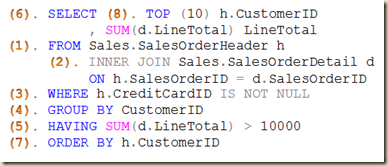
This is because of the logical order query processing. Clauses like GROUP BY, WHERE, and HAVING are processed prior to SELECT. Therefore the aliases used are unknown to them. Below image shows a SELECT statement. Elements in it are numbered based on the processing order.

Order

Note that you can refer aliases with ORDER BY. The reason for it is, ORDER BY (7) is processed after the SELECT (6). Read more on this at: http://dinesql.blogspot.com/2011/04/logical-query-processing-phases-in.html.

Aliases for expressions: Should I write it again with GROUP BY?
We assign aliases for expressions used in SELECT. However, as the alias cannot be referred with a clause like GROUP BY, same expression has to be duplicated which increases the cost of maintainability. It can be overcome by implementing a table expression without hindering the performance.

1 -- expression is set with 2 -- both column and group by 3 SELECT 4 YEAR(OrderDate) OrderYear 5 , SUM(SubTotal) TotalAmount 6 FROM Sales.SalesOrderHeader 7 GROUP BY YEAR(OrderDate) 8 9 -- expression is set only with 10 -- the column 11 SELECT 12 OrderYear 13 , SUM(SubTotal) TotalAmount 14 FROM (SELECT 15 YEAR(OrderDate) OrderYear 16 , SubTotal 17 FROM Sales.SalesOrderHeader) Sales 18 GROUP BY OrderYear
Aliases for tables
It is possible to have aliases for tables too. It does not support all three ways but AS keyword and adding right after the table name. Here is an example;

1 SELECT Orders.OrderDate 2 , Orders.SubTotal 3 FROM Sales.SalesOrderHeader AS Orders 4 5 SELECT h.PurchaseOrderNumber OrderNumber 6 , p.Name Product 7 , d.LineTotal 8 FROM Sales.SalesOrderHeader h 9 INNER JOIN Sales.SalesOrderDetail d 10 ON h.SalesOrderID = d.SalesOrderID 11 INNER JOIN Production.Product p 12 ON d.ProductID = p.ProductID

Sunday, January 12, 2014

SQL Server Management Studio – Five ways of executing a code

How many ways you have used for executing a T-SQL code in Management Studio? I am sure you have used two well-known options but other three options are unknown to many. Here are all five ways;

  1. Clicking Execute button in SQL Editor toolbar.
  2. Pressing F5 key in keuboard.
  3. Pressing CTRL+E shortcut key.
  4. Pressing CTRL+SHIFT+E shortcut key.
  5. Pressing ALT+X shortcut key.

Analysis Services: Exception of type 'System.OutOfMemoryException' was thrown.

There could be many reasons for this but in most cases, this misleads us, specifically if the MDX is running with Management Studio. You see that there is enough memory, and you are confident of the MDX, but why the Management Studio throws this?

Reason is simple. This Knowledge base article explains it;

“SSMS is a 32-bit process. Therefore, it is limited to 2 GB of memory. SSMS imposes an artificial limit on how much text that can be displayed per database field in the results window. This limit is 64 KB in "Grid" mode and 8 KB in "Text" mode. If the result set is too large, the memory that is required to display the query results may surpass the 2 GB limit of the SSMS process. Therefore, a large result set can cause the error that is mentioned in the "Symptoms" section.”

How do we make sure that MS throws the exception because of its limitations, not because of anything else. Simplest way is, get the code executed using another technique. It can be a .NET code using a provider that supports executing MDX against SSAS or could be a SSIS package. I used a simple SSIS package that has a connection to source and data reader destination. Here is the way;

  1. Create a new SSIS project and add an OLE DB Connection to SSAS.
    image
  2. Make sure you add “Format=Tabular” for Extended Properties in Connection Manager.
    image
  3. Add a data flow task and configure an OLE DB Source.
  4. Set the SSAS connection made to OLDE DB Source and add the MDX statement as SQL Command.
  5. Add a Data Reader destination and connect with the source.
  6. Execute and see.
    image

If the code gets executed without any issue, it means you are hit by SSMS limitation not because of anything else.