Showing posts with label Dimension. Show all posts

Thursday, August 3, 2017

Script for creating DimTime Dimension Table and populating data

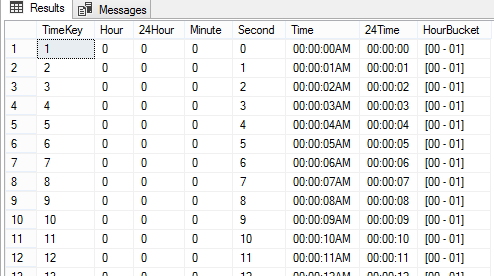
The posts I made on date dimension table (Script for populating Date Dimension with Financial Year and Loading Data Script for Snowflake type Date Dimension) had a good response and few asked about the same for Time related table. This is one of the old scripts I used for populating Time Dimension, it maintains up to the second but if you need more, the script can be easily change.

Here is the code for creating the table and populating data.

CREATE TABLE dbo.Time
(
 TimeKey int identity(1,1) 
 , Constraint pk_Time primary key (TimeKey)
 , [Hour] smallint not null
 , [24Hour] smallint not null
 , [Minute] smallint not null
 , [Second] smallint not null
 , [Time] char(10) not null
 , [24Time] char(8) not null
 , HourBucket char(9)
);
GO

DECLARE @Hour smallint = 0
DECLARE @Minute smallint = 0
DECLARE @Second smallint = 0

WHILE (@Hour < 24)
BEGIN

 WHILE (@Minute < 60)
 BEGIN

  WHILE (@Second < 60)
  BEGIN

   INSERT INTO dbo.[Time]
    ([Hour], [24Hour], [Minute], [Second], [Time], [24Time], HourBucket)
   VALUES
    (CASE WHEN @Hour > 12 THEN @Hour - 12 ELSE @Hour END
    , @Hour, @Minute, @Second
    , REPLICATE('0', 2 - LEN(CASE WHEN @Hour > 12 THEN @Hour - 1 ELSE @Hour END)) + CONVERT(varchar(2), CASE WHEN @Hour > 12 THEN @Hour - 1 ELSE @Hour END) 
     + ':' + REPLICATE('0', 2 - LEN(@Minute)) + CONVERT(varchar(2), @Minute) 
     + ':' + REPLICATE('0', 2 - LEN(@Second)) + CONVERT(varchar(2), @Second) 
     + CASE WHEN @Hour > 12 THEN 'PM' ELSE 'AM' END
    , REPLICATE('0', 2 - LEN(@Hour)) + CONVERT(varchar(2), @Hour) 
     + ':' + REPLICATE('0', 2 - LEN(@Minute)) + CONVERT(varchar(2), @Minute) 
     + ':' + REPLICATE('0', 2 - LEN(@Second)) + CONVERT(varchar(2), @Second) 
    , '[' + REPLICATE('0', 2 - LEN(@Hour)) + CONVERT(varchar(2), @Hour) 
     + ' - ' 
     + REPLICATE('0', 2 - LEN(@Hour+1)) + CONVERT(varchar(2), @Hour+1) + ']')
   SET @Second += 1;
  END
  SET @Second = 0;
  SET @Minute += 1;
 END
 SET @Minute = 0;
 SET @Hour += 1;
END
GO

SELECT * FROM dbo.[Time];

Saturday, May 16, 2015

What is a Junk Dimension?

Dimension represents entities that will be used for analyzing facts in the data warehouse. There are different type of dimensions like Regular, Slowly Changing, Self-Referencing and Junk. Many know about all of these except Junk.

Junk dimension is a dimension that combines multiple dimensions that have attributes with low cardinality and only few discrete values. This makes the process clean and reduce the complexity of the dimensional model.

Here is an example. Assume that three dimensions have been identified during requirement gathering process and they hold small number of values;


Rather than maintaining three tables for these three dimension, one dimension table can be introduced combining all values;


It represents all possible combinations of three dimensions and can be used with Fact tables without any issue. This dimension is called as Junk Dimension.

Thursday, May 14, 2015

What are the reasons for introducing a surrogate key to a dimension table?

When designing a dimension table such as Product and Employee in a data warehouse, a surrogate key is introduced for implementing an unique column for identifying each row uniquely in the entity. Even though we usually see this with almost data warehouses, it is not a must to implement a surrogate key. If the key of the source table related to the entity can be used as the key column of the dimension table, there is no necessity to introduce another column. How do we decide? What are the factors for deciding whether we need a new surrogate key for the dimension table or we can use the source key as the key column in the dimension table?


Here are some factors that can be used for deciding whether you need a new surrogate key (or artificial key) for your dimension table;

  1. Key of the source is a wide string such as CUS01X5679. It is not recommended to use a string data type as the dimension key unless it is fixed and small.
  2. Key of the source is a GUID. This is a 16-bytes value and it is too lengthy for the dimension key. In addition to that, if GUIDs in the source are not sequentially generated, it is not good for the key at all.
  3. Dimension table has to be loaded from multiple data sources. If table has to be populated from multiple sources, there is a chance to get same key from two differences sources for same record. This make impossible to make the source key as the dimension key because two records cannot be added with the same key.
  4. Dimension table is a SCD type 2 dimension. If the dimension table is a Slowly Changing Type 2 dimension, it needs to maintain same record with multiple versions addressing changes and maintaining the history. If the sources key is used as the dimension key, it is not possible to make another version for the same record with the same key.
  5.  Source reuses the key for new items. Some systems allow to delete records from entities and insert new records with the same keys that were used with the deleted records. Since the old record is already taken to dimension table, it is not possible to insert the new record with the same key if source key is the dimension key.
If you do not see any of reasons mentioned above, no harm, you can use the source key as the dimension key.

Sunday, April 6, 2014

Reasons for adding a surrogate key for dimension tables

As a best practice, we always add a new key, known as a surrogate key to dimension tables for identifying the records uniquely. However, generally, the unique business key becomes the primary key of relational tables related to business entities but once the surrogate key is added to dimension tables, we make it as the primary key without reusing the business key. Here is an example from AdventureWorksDW data warehouse.

image

Surrogate key is an integer that is assigned sequentially when records are added. There are many other names for this such as artificial key, synthetic key, meaningless key, integer key or non-natural key. Do we really need this? Does it seem inappropriate using the business keys for primary keys? It may seem sensible for reusing, but here are some valid reasons for not using business keys but using surrogate keys;

  1. Dimension is populated from multiple sources
    In many cases, dimensions are populated from multiple sources. This always introduces incompatibility between business keys’ data types originating from sources. Not only that, the uniqueness of the business key is not always guaranteed too.
  2. Business key is reassigned when an object becomes obsolete
    OLTP systems always focus on current operations giving less importance to the history. If an object becomes inactive or obsolete (Example: Organization decides to discontinue a product), there is a high probability to get the business key used assigned to a new object. If the business key is used as the key of the dimension, this becomes an issue because dimension already holds an object with the same business key.
  3. Business key is a complex string or GUID
    Business keys used in source systems could be formed combining numbers and different characters or with GUIDs. In such scenario, there is no harm of using the business key as the primary key of the dimension table as long as the uniqueness is guaranteed. However, in terms of performance, it makes more effective to have an integer surrogate key than a complex string.
  4. Integer improves the performance
    As mentioned with reason 3, it is always better to have an integer key as the key of the dimension even though the business key is a simple string. This improves the efficiency of the table and speeds up the data retrieval when joining with facts.
  5. Objects without business keys
    When populating dimension records, there could be a situation that object needs to be populated without a business key. Good example on this is, holding a newly introduced product in the Product dimension, before extracting it from the source, for supporting a transaction exist in the fact table. Another example is, holding an anonymous customer in the Customer dimension for supporting promotion events recorded in the fact table. It is become possible for holding these objects in dimension tables as “Unknown”, “Not applicable”, or “Anonymous” when surrogate key is used.
  6. Objects are versioned in dimension tables
    In order to maintain the history in dimension tables, same objects are versioned by adding multiple records (These dimensions are called as Slowly Changing Dimension Type 2). Example: Customer is recorded with his country Sri Lanka. Later customer becomes a citizen of Australia. In OLTP systems, it is just a change for country column. But in data warehousing, for maintaining the history for events recorded (facts), a new version (new record) of the customer is added with Australia for the country. This is not possible if the business key of the customer is used as the key of the dimension.

Of course, the maintenance cost gets increased and a mechanism has to be introduced for generating surrogate keys and linking them with foreign keys in fact tables. But it is not as difficult as many think because there are many built-in facilities available in DBMS and ETL systems.

Sunday, April 17, 2011

Ordering Attribute Members of Dimensions in Analysis Services

As each attribute in a dimension can have a key column and optionally name column, attribute can be sorted by either key or name column. Sorting is done with OrderBy property. Once the property is set, attribute is sorted in ascending when it is displayed. This is okay with most cases but in some cases sorting is needed in a different way. Examples cane be, sorting in descending order, sorting by not its key or name, by some other attribute. This post discusses these exceptional cases.

Sort by some other attribute
Good scenario for this is Month attribute in a Month dimension. Usually we set Month attribute’s Key Column as MonthKey and its Name Column as MonthName. If the sorting is set as Key with OrderBy property, months will be ordered chronologically only if you have inserted them in source table in an order. If they are not inserted in an order, months will not be ordered as we want. Again, if OrderBy property is set as Name, months will be displayed in alphabetical order which is not the way we usually want. See the image below.

Ordering1

Note that records are not inserted in an order. Month attribute’s key is set with MonthKey and its name is set with MonthNameWithYear. You can see how they are displayed with OrderBy set as key and name.

In order to have the proper ordering on Month attribute, we need an additional column to be used for sorting. Best candidate is MonthNumberOfYear column. It can be used as sorting key for Month. One requirement for doing this is, have a relationship between Month and MonthNumberOfYear, in other words, making MonthNumberOfYear as Related Attribute for Month. By default, when the dimension is created, wizard adds all the dimension’s attributes as related attributes of the key. In this case, it has been added too. If not, you need to manually add this through Attribute Relationships (a tab) in BIDS’s Dimension designer.

Once the column is set as a related attribute, change the OrderBy to AttributeKey and set OrderByAttribute as MonthNumberOfYear.

Ordering2

Once processed, months will be displayed in an order as we want. There are two things to be considered in this setting. If MonthNumberOfYear column is not required for querying, you can hide it by setting AttributeHierarchyEnabled property to false. Other thing is, Relationship Type between an attribute and related attribute. It can be set as either Rigid or Flexible. If the relationship is fixed over time, not going to change (Type 2), rigid is the best option. If the relationship can change over time (Type 1), type has to be set as Flexible.

Descending Order
Once the sorting is set for an attribute, it is sorted in ascending order. That is the only possible sorting order supported by Analysis Services. If descending order is required, just like the previous one, support is needed from another attribute that maintains value in descending order. For example, if months need to be sorted in descending, MonthNumberOfYear has to be filled with values 12 to 1, not 1 to 12.