Showing posts with label SELECT. Show all posts

Saturday, December 17, 2016

Locking selected records until the transaction is completed

SQL Server handles locks efficiently and it places relevant locks based on the way we access records. If you perform an action such as INSERT, UPDATE, DELETE against records, SQL Server makes sure that records for the operation are exclusively locked and no one can access them. However, what if you need to make sure that no one can modify your selected records until you complete the transaction?

Generally, SQL Server obtains shared locks when we retrieve records using SELECT statement but it does not keep them. The obtained locks are immediately released once all records are sent to the client.

We can use REPEATABLE READ Isolation Level for handling this. This Isolation Level makes sure that records selected during the transaction cannot be modified by other users until we complete the transaction.

There is another easy way of handling this. We can use UPDLOCK Hint with the SELECT statement, locking the records exclusively. This hint takes Update Locks for Read Operation only at the row level or page level. See the underlined words, Page Level, means you might see that few number of records are locked even though you have selected only one record, because if SQL Server takes a page lock, then all records in the page will be locked.

However, for most cased, this helps to protect the record until we complete the process on selected records. Here is the way of doing it.

Execute this with a new Connection
USE AdventureWorks2014
GO

-- Starting a transaction
BEGIN TRAN

-- Selecting a record
SELECT * FROM Production.Product
WITH (UPDLOCK)
WHERE ProductID = 4

Now execute this with another connection and see.
USE AdventureWorks2014;
GO

-- This is possible, can get the record
SELECT * FROM Production.Product
WHERE ProductID = 4;

-- This is not possible until the 
-- first tranaction is completed
UPDATE Production.Product
 SET Color = 'Black'
WHERE ProductID = 4;


Tuesday, August 2, 2016

SQL Server Variable Assignment - SET or SELECT?

Declaration variables and assigning values in different ways is something we see as a very common code in modules like stored procedures and functions. It is possible to assign a value at the declaration or a value can be assigned after the declaration either using SET or SELECT. A question raised on it, what would be the best and which gives better performance, when assigning the value using SET or SELECT. This is what I explained;

Let's see the differences one by one;
1. Only one variable can be set with a value with a single SET statement but with the SELECT statement, multiple variables can be set with values using a single SELECT statement.

-- Declaring variables without assigning values
DECLARE @Variable01 int;
DECLARE @Variable02 int;

-- New two SET statements for assigning values
SET @Variable01 = 100; SET @Variable02 = 200; 
SELECT @Variable01, @Variable02;

-- Assigning values using a single SELECT
SELECT @Variable01 = 300, @Variable02 = 300;
SELECT @Variable01, @Variable02;
GO


2. Both SET and SELECT support assigning values using a query. Just like the number (1), SELECT can be used for setting multiple variables.

USE WideWorldImporters;
GO

-- Declaring variables without assigning values
DECLARE @Variable01 int;
DECLARE @Variable02 int;

-- Assigning a value using a query, this works as expected
SET @Variable01 = (SELECT COUNT(*) FROM Sales.Customers); 
SELECT @Variable01;

-- Assigning values using a query, this works as expected
SELECT @Variable01 = COUNT(*), @Variable02 = AVG(CustomerID) FROM Sales.Customers

SELECT @Variable01, @Variable02;
GO


3. When assigning values using a query, if the query returns more than one record, SET returns an error whereas SELECT takes the first record and assign the value to the variable.

USE WideWorldImporters;
GO

-- Declaring variables without assigning values
DECLARE @Variable01 int;
DECLARE @Variable02 int;

-- Assigning a value using a query, this query returns more than one value
-- , hence SET throws an error
SET @Variable01 = (SELECT CustomerID FROM Sales.Customers); 
SELECT @Variable01;

-- Assigning a value using a query, this query returns more than one value
-- , but SELECT takes the first value without throwing an error
SELECT @Variable01 = CustomerID FROM Sales.Customers

SELECT @Variable01, @Variable02;
GO


4. When assigning values using a query, if the query returns no record, NULL will be set to the variable with SET statement but SELECT statement will keep the old value without changing.

USE WideWorldImporters;
GO

-- Declaring variables, assigning values
DECLARE @Variable01 int = 0;
DECLARE @Variable02 int = 0;

-- Assigning a value using a query
-- This query does not return any record, hence variable becomes NULL
SET @Variable01 = (SELECT CustomerID FROM Sales.Customers WHERE BuyingGroupID = 100 ); 

-- Assigning a value using a query
-- This query does not return any record, but initial value will not be replaced with a NULL
SELECT @Variable02 = CustomerID FROM Sales.Customers WHERE BuyingGroupID = 100;

SELECT @Variable01, @Variable02;

5. One more point, remember that SET is ANSI standard for assigning variables but SELECT is not.

Tuesday, January 14, 2014

Why column aliases are not recognized by all clauses?

Column aliases are commonly used for relabeling columns for increasing the readability of SQL statements. However aliases cannot be referred with all clauses used in SQL statements. Have a look on below code and its output.

1 SELECT 2 GroupName AS DepartmentGroup 3 , COUNT(Name) AS NumberOfDepartment 4 FROM HumanResources.Department 5 GROUP BY DepartmentGroup

Output:
Msg 207, Level 16, State 1, Line 5
Invalid column name 'DepartmentGroup'.

As you see, GROUP BY clause does not recognize the alias “DepartmentGroup” used for GroupName column. Not only GROUP BY, WHERE and HAVING clauses do not recognize aliases too. You can simply refer the same column name with these clauses without thinking much, however knowing the reason for this will definitely add something to your knowledgebase. Not only that, it will help you to properly construct your SQL statements too.

Possible ways of aliasing columns
There are three ways of aliasing columns with identical output results. One method is to use AS keyword, next is to use equal sign (=), and the other way is positioning the alias immediately following the column name.

1 SELECT 2 GroupName AS DepartmentGroup 3 , COUNT(Name) AS NumberOfDepartment 4 FROM HumanResources.Department 5 GROUP BY GroupName 6 7 SELECT 8 DepartmentGroup = GroupName 9 , COUNT(Name) AS NumberOfDepartment 10 FROM HumanResources.Department 11 GROUP BY GroupName 12 13 SELECT 14 GroupName DepartmentGroup 15 , COUNT(Name) AS NumberOfDepartment 16 FROM HumanResources.Department 17 GROUP BY GroupName

In terms of performance, there is no difference between these three methods but readability. Most prefer AS keyword and it is the recommended way by industrial experts.

Why all clauses cannot refer aliases added?
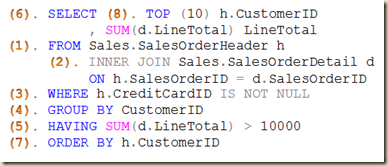
This is because of the logical order query processing. Clauses like GROUP BY, WHERE, and HAVING are processed prior to SELECT. Therefore the aliases used are unknown to them. Below image shows a SELECT statement. Elements in it are numbered based on the processing order.

Order

Note that you can refer aliases with ORDER BY. The reason for it is, ORDER BY (7) is processed after the SELECT (6). Read more on this at: http://dinesql.blogspot.com/2011/04/logical-query-processing-phases-in.html.

Aliases for expressions: Should I write it again with GROUP BY?
We assign aliases for expressions used in SELECT. However, as the alias cannot be referred with a clause like GROUP BY, same expression has to be duplicated which increases the cost of maintainability. It can be overcome by implementing a table expression without hindering the performance.

1 -- expression is set with 2 -- both column and group by 3 SELECT 4 YEAR(OrderDate) OrderYear 5 , SUM(SubTotal) TotalAmount 6 FROM Sales.SalesOrderHeader 7 GROUP BY YEAR(OrderDate) 8 9 -- expression is set only with 10 -- the column 11 SELECT 12 OrderYear 13 , SUM(SubTotal) TotalAmount 14 FROM (SELECT 15 YEAR(OrderDate) OrderYear 16 , SubTotal 17 FROM Sales.SalesOrderHeader) Sales 18 GROUP BY OrderYear
Aliases for tables
It is possible to have aliases for tables too. It does not support all three ways but AS keyword and adding right after the table name. Here is an example;

1 SELECT Orders.OrderDate 2 , Orders.SubTotal 3 FROM Sales.SalesOrderHeader AS Orders 4 5 SELECT h.PurchaseOrderNumber OrderNumber 6 , p.Name Product 7 , d.LineTotal 8 FROM Sales.SalesOrderHeader h 9 INNER JOIN Sales.SalesOrderDetail d 10 ON h.SalesOrderID = d.SalesOrderID 11 INNER JOIN Production.Product p 12 ON d.ProductID = p.ProductID